
Version history
No version history is currently published on this page.
Generate brick, tile, parquet, paving and custom repeating material patterns.
No version history is currently published on this page.
Interface
BricksMap helps you build repeatable materials without manually cutting texture maps. The plugin generates the laying pattern, controls joints, colors, variations and nested maps, and automatically creates Bump and NormalBump for surface relief.
01
previews of available patterns;
02
Separate colors and maps for Brick 1, Brick 2 and Grout. This allows you to mix several materials and assign a separate grout texture.
03
Randomization controls: color variance, hue, random shift, seed, fragmentation and rotation. They make the material less repetitive.
04
After setting up the main pattern you do not need to draw relief maps separately. Bump and NormalBump are created automatically from the pattern and depth parameters, making material setup faster and visually consistent.
Video · YouTube
BricksMap helps you build repeatable materials without manually cutting texture maps. The plugin generates the laying pattern, controls joints, colors, variations and nested maps, and automatically creates Bump and NormalBump for surface relief. Watch the complete workflow and interface demonstration.
BricksMap — video demonstration for Autodesk 3ds Max
Pattern library
The plugin is configured directly in the Material Editor. The user selects a pattern, sets element and grout size, and controls UV transforms, variations, colors, nested maps and the generated Bump / Normal Bump maps.
01
Masonry patterns
Brick and masonry patterns for facades, interior walls, cladding and ceramic brick materials.
Masonry patterns
1-2 Running pattern for brickwork and facade cladding. Suitable for walls, interior accents and procedural materials.
Masonry patterns
1-3 Running pattern for brickwork and facade cladding. Suitable for walls, interior accents and procedural materials.
Masonry patterns
Common Flemish pattern for brickwork and facade cladding. Suitable for walls, interior accents and procedural materials.
Masonry patterns
Fine Stack pattern for brickwork and facade cladding. Suitable for walls, interior accents and procedural materials.
02
Parquet patterns
Wood floor and decorative parquet layouts for interior visualization.
Parquet patterns
Basket Weave pattern for parquet and decorative floors. Useful for interior visualization and alternative laying layouts.
Parquet patterns
Chevron pattern for parquet and decorative floors. Useful for interior visualization and alternative laying layouts.
Parquet patterns
Herringbone pattern for parquet and decorative floors. Useful for interior visualization and alternative laying layouts.
Parquet patterns
Modular Ashlar pattern for parquet and decorative floors. Useful for interior visualization and alternative laying layouts.
Parquet patterns
Parquet Tile 1 pattern for parquet and decorative floors. Useful for interior visualization and alternative laying layouts.
Parquet patterns
Parquet Tile 2 pattern for parquet and decorative floors. Useful for interior visualization and alternative laying layouts.
Parquet patterns
Parquet Tile 3 pattern for parquet and decorative floors. Useful for interior visualization and alternative laying layouts.
Parquet patterns
T-Shape pattern for parquet and decorative floors. Useful for interior visualization and alternative laying layouts.
03
Pavement patterns
Paving patterns for paths, plazas, public spaces and landscape design.
Pavement patterns
Hexagons pattern for paving, paths and plazas. Suitable for landscape and architectural visualization.
Pavement patterns
I-Paver pattern for paving, paths and plazas. Suitable for landscape and architectural visualization.
Pavement patterns
Maple Leaf pattern for paving, paths and plazas. Suitable for landscape and architectural visualization.
Pavement patterns
Paving Tile 1 pattern for paving, paths and plazas. Suitable for landscape and architectural visualization.
Pavement patterns
Paving Tile 2 pattern for paving, paths and plazas. Suitable for landscape and architectural visualization.
Pavement patterns
Triangles 2 pattern for paving, paths and plazas. Suitable for landscape and architectural visualization.
Pavement patterns
Wave Checker pattern for paving, paths and plazas. Suitable for landscape and architectural visualization.
Pavement patterns
Wave Striped pattern for paving, paths and plazas. Suitable for landscape and architectural visualization.
04
Abstract patterns
Decorative geometric layouts for non-standard surfaces and accent materials.
Abstract patterns
Decorative Diagonal pattern for geometric surfaces, panels and accent materials.
Abstract patterns
Decorative Triangles pattern for geometric surfaces, panels and accent materials.
05
Custom patterns
Custom layouts for quickly creating your own pattern without manually assembling textures.
Custom patterns
Custom Custom Tiles pattern for non-standard layouts and proprietary material collections.
Custom patterns
Custom Pattern 1 pattern for non-standard layouts and proprietary material collections.
Custom patterns
Custom Pattern 2 pattern for non-standard layouts and proprietary material collections.
Custom patterns
Custom Pattern 3 pattern for non-standard layouts and proprietary material collections.
Custom patterns
Custom Pattern 4 pattern for non-standard layouts and proprietary material collections.
Custom patterns
Custom Pattern 5 pattern for non-standard layouts and proprietary material collections.
Custom patterns
Custom Pattern 6 pattern for non-standard layouts and proprietary material collections.
Custom patterns
Custom Pattern 7 pattern for non-standard layouts and proprietary material collections.
Custom pattern
Your own pattern can be added to the plugin for $50. Send any image to the site administrator and pay for converting the pattern into mathematical logic and adding it to the code.
Interface
The plugin is configured directly in the Material Editor. The user selects a pattern, sets element and grout size, and controls UV transforms, variations, colors, nested maps and the generated Bump / Normal Bump maps.
01
The base 3ds Max coordinate block: it defines the channel and projection system used by the procedural BricksMap pattern.
02
This block selects Pattern and Mode and sets horizontal and vertical element counts, module sizes and joint width.
03
Master transform for the pattern: tiling, offset and rotation. It helps quickly adjust the scale and direction of the laying pattern.
04
Randomization controls: color variance, hue, random shift, seed, fragmentation and rotation. They make the material less repetitive.
05
Local transform for the nested Brick Map inside a single element. It runs before the child map color is sampled and lets you control the texture of each brick or tile.
06
Separate colors and maps for Brick 1, Brick 2 and Grout. This allows you to mix several materials and assign a separate grout texture.
07
A child heightfield map for the classic Bump slot. It uses the same laying pattern and can be enhanced with an additional bump texture.
08
A child tangent-space normal map. It can be connected to the standard Normal Bump map to get consistent relief without manually preparing a normal map.
Automatic relief
After setting up the main pattern you do not need to draw relief maps separately. Bump and NormalBump are created automatically from the pattern and depth parameters, making material setup faster and visually consistent.
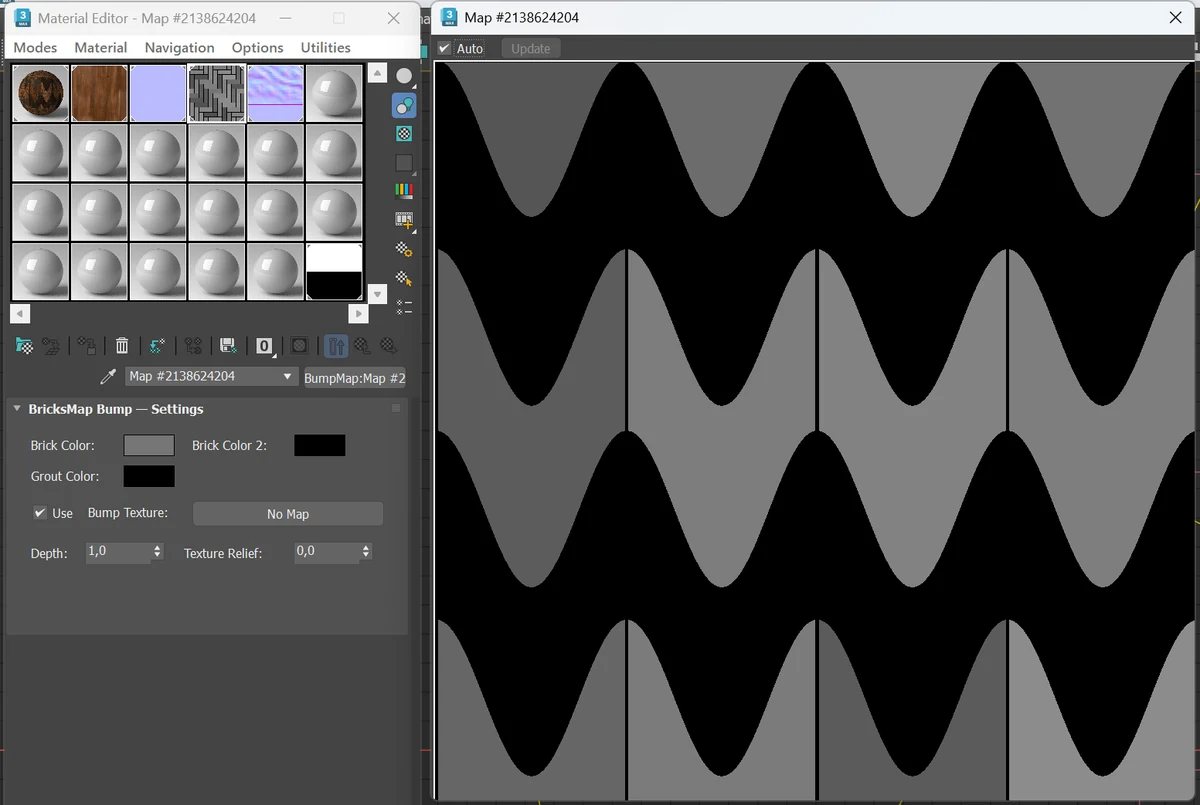
Bump MapThe screenshot shows an automatically generated bump map for the Wave Striped pattern. You can additionally set Depth, Texture Relief and a separate bump texture.
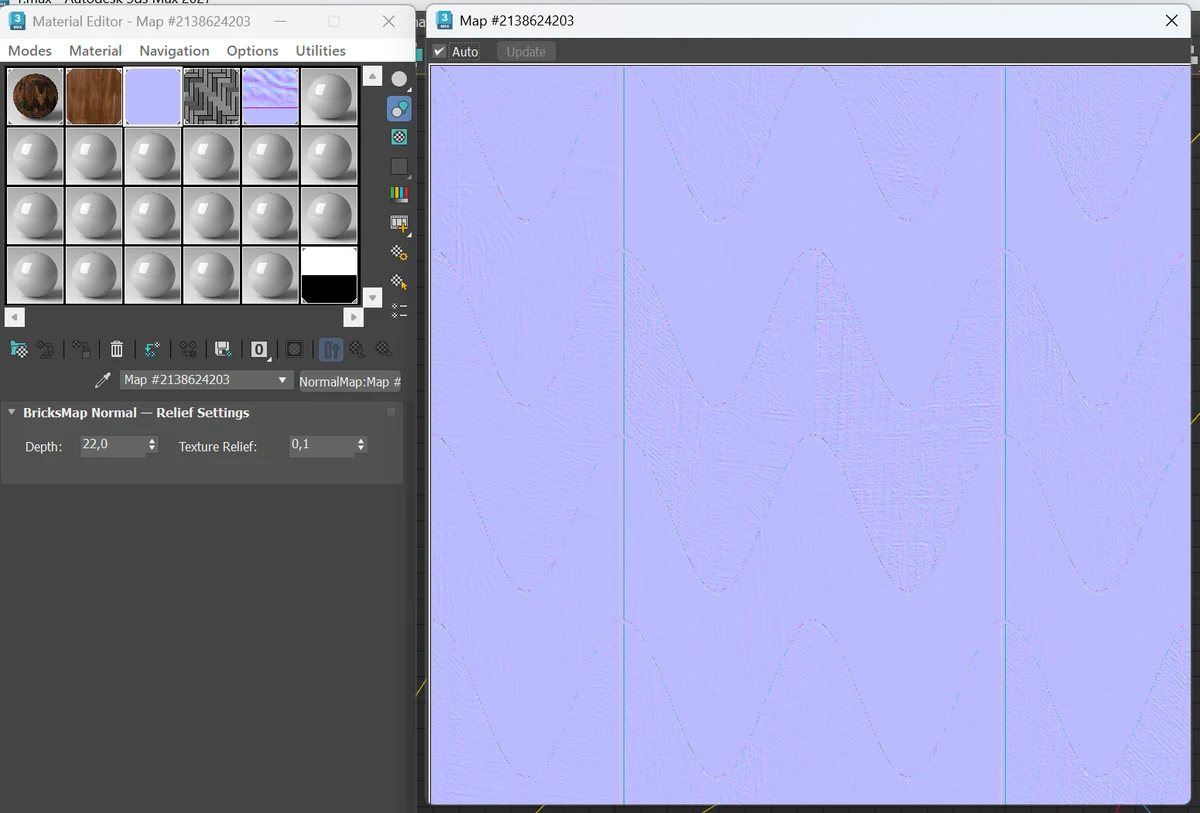
NormalBump MapThis screenshot shows that BricksMap creates a ready normal map for the same pattern. It helps produce readable relief in lighting and reflections.
From the user manual
BricksMap is a procedural 2D map for 3ds Max. The main map is used in Diffuse and other color slots, while the child BricksMap Bump and BricksMap Normal maps are automatically synchronized with the same pattern, element size, joints and variations.
01
This block selects Pattern and Mode and sets horizontal and vertical element counts, module sizes and joint width.
02
Separate colors and maps for Brick 1, Brick 2 and Grout. This allows you to mix several materials and assign a separate grout texture.
03
After setting up the main pattern you do not need to draw relief maps separately. Bump and NormalBump are created automatically from the pattern and depth parameters, making material setup faster and visually consistent.
BricksPattern vs BricksMap
best results are achieved using both together in one scene.
BricksMap
BricksPattern
Licensing
BricksMap has its own purchase page. After payment, the license appears in the user account. The plugin can then be activated online through the website or offline by e-mail request/response.


