
Version history
No version history is currently published on this page.
Access control, auditing, administration and protected operation of Autodesk Revit Server infrastructure.
No version history is currently published on this page.
RSG · Deep dive
Revit Server Guard is a software gateway that's installed on the same host as Autodesk Revit Server. It intercepts TCP and HTTP traffic to the RS ports, reads its metadata (which user, which project, which section, which action), and applies access rules that don't exist in Revit Server itself.
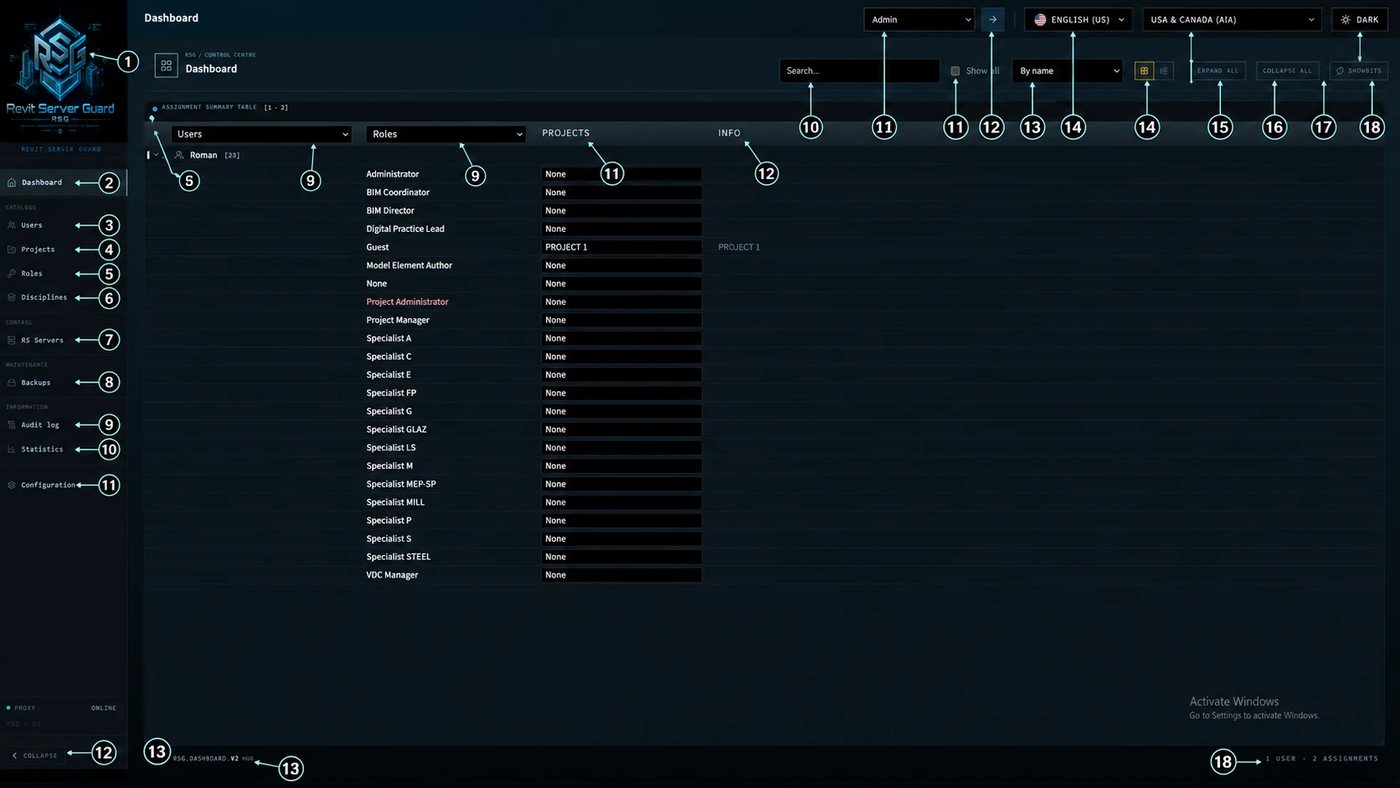 Overview — access assignment summary tableThe administrator’s start screen. It shows who has which role in each project and section, with search, grouping, bulk actions, and refresh.
 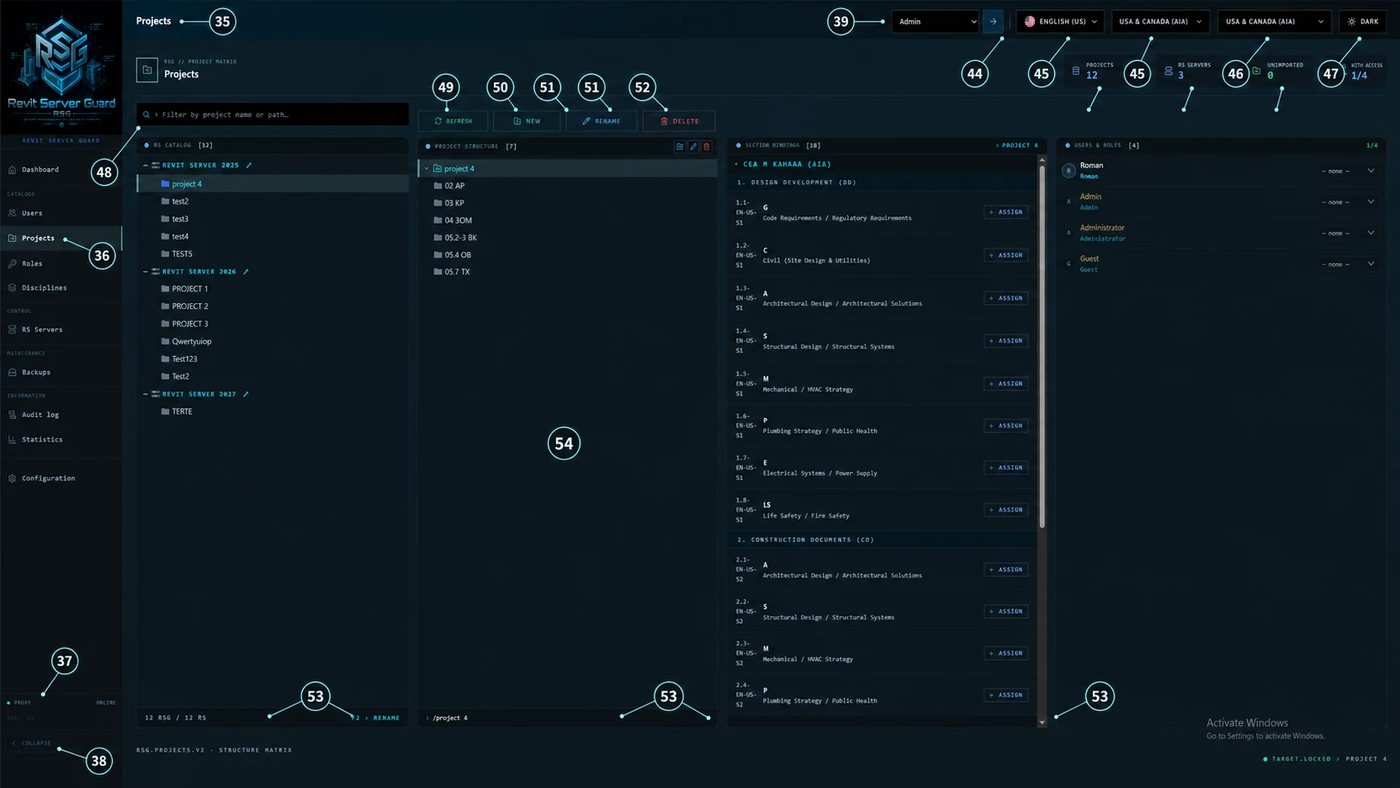 Projects — Revit Server project catalogueThe link between real Revit Server projects and RSG administration: server path, country, folder tree, section bindings, and user assignments.
 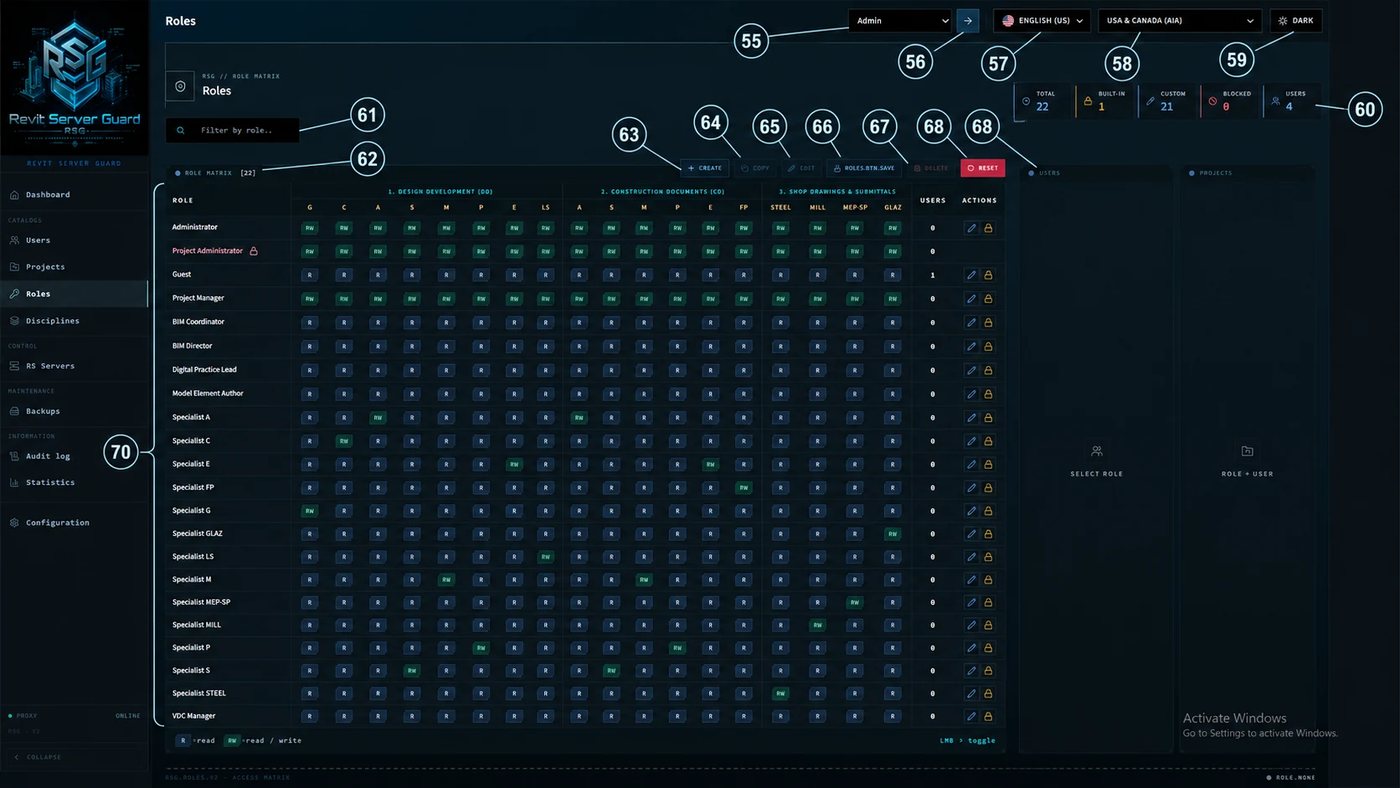 Roles — permission matrix by sectionThe main place for configuring authorization: which role can write to which section or discipline.
 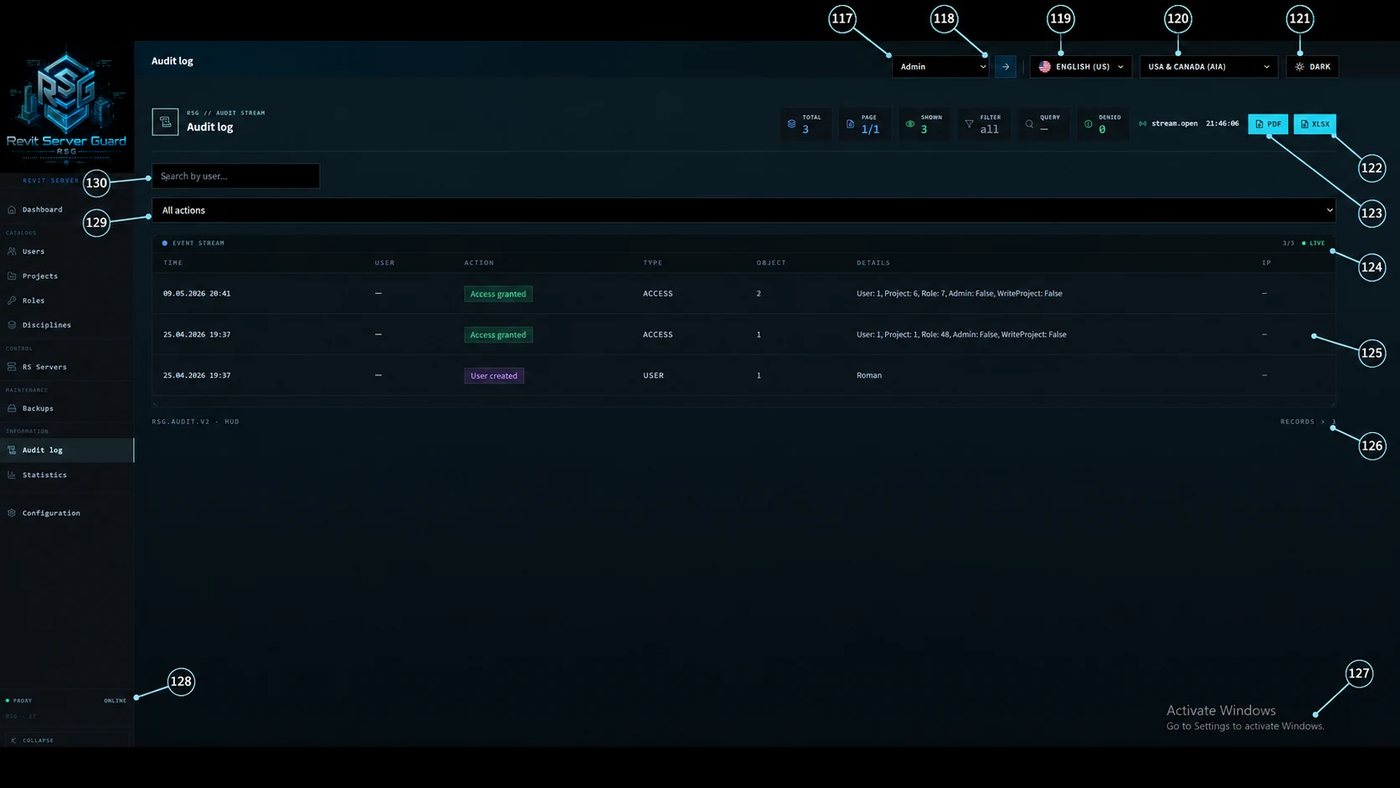 Audit log — event stream and exportA full history of changes: who did what, where, and when, with filters by project, user, action type, and PDF/XLSX export.
01 — Overview
Revit Server Guard is a software gateway that's installed on the same host as Autodesk Revit Server. It intercepts TCP and HTTP traffic to the RS ports, reads its metadata (which user, which project, which section, which action), and applies access rules that don't exist in Revit Server itself.
Out of the box, Revit Server does not provide transparent access rights by user, project, section and action. If a participant has access to the server, RS has no built-in model that reliably limits that participant only to their area of responsibility. In a small team this may be acceptable. In projects with many companies, temporary participants and different responsibility levels, training and internal regulations are not enough: RSG removes this technical limitation.
01 Overview — access assignment summary tableThe administrator’s start screen. It shows who has which role in each project and section, with search, grouping, bulk actions, and refresh.
02 — Architecture
RSG is one monolith, but four separate modules installed together. This is intentional: each component is responsible for its own scope and can be restarted independently when needed.
Important
Revit Server stays exactly as it was. RSG doesn't modify its binaries, doesn't rewrite the database, doesn't replace configs. It sits alongside and operates through standard network interfaces. If you turn RSG off, Revit Server keeps working exactly as it did before RSG was installed.
02 RS gateways — proxy and protection managementThe RSG protection layer for network access to Revit Server: hosts, proxy paths, protection status, and service start/stop.
03 — Access control
RSG grants rights not «all or nothing» but granularly. You don't hand out «server access» — you hand out «access to project X, section Architecture, read-only». Under the hood this happens at the SOAP-request level of Revit Server, where RSG inspects the operation type and makes a decision.
Users and AD groups are bound to roles. A role is a set of permissions for a specific project and its sections. One user can have different roles in different projects: «coordinator» in one, «observer» in another, «no access» in a third.
03 Projects — Revit Server project catalogueThe link between real Revit Server projects and RSG administration: server path, country, folder tree, section bindings, and user assignments.
Below — how it looks in the admin panel. The matrix: projects in rows, roles in columns, permission state in cells.
Legend: full access · read only · mixed by section · none
Every rule is expressed as a JSON document that can be edited through the UI or imported in batch from CSV/JSON when migrating from in-house tools.
04 Roles — permission matrix by sectionThe main place for configuring authorization: which role can write to which section or discipline.
04 — Admin panel
All management — through a React SPA available locally on the RSG host. No regedit, no gpedit, no manual XML edits. The admin opens a page in the browser and sees the dashboard, license, audit, and permissions matrix. If remote access is needed, it's served behind a reverse proxy with TLS.
The home page is the dashboard. Four numbers across the top for the day, an event feed below, and a license panel.
05 Users — identity register and assignmentsA controlled list of users, their status, projects, roles, and actions for creating, editing, importing, and exporting accounts.
06 Sections — discipline catalogue and bindingsThe discipline directory such as AR, KR, MEP, and the bindings between sections and real Revit Server project folders.
05 — Audit
Audit isn't an optional feature, it's part of the main flow. Every request that passes through RSG.Proxy leaves a record: who, what, against which project/section, which action, what result, from which IP, from which Revit version. Logs are stored locally and exported to CSV/JSON/SIEM.
The admin panel has a table with filters on every field. Clicking a row opens the full event JSON.
Retention
By default the log is kept for 18 months. This is configurable. Logs can be streamed to a SIEM system over webhook (JSON payload), written to your company's SQL Server, or exported in batch via CLI.
07 Audit log — event stream and exportA full history of changes: who did what, where, and when, with filters by project, user, action type, and PDF/XLSX export.
08 Backups — project backup gridCentralized backup scheduling for Revit Server projects with storage path, schedule, last backup date, and success/error status.
06 — Licensing
An RSG license is a signed envelope (LicenseEnvelope) containing a payload with rights and a signature. The signature is produced on our side with an ECDSA P-256 private key and verified on the client side with a public key embedded in the RSG binary.
That means: forging a license or running «your own License API» at the same URL is impossible without the private key. A keygen physically can't exist — you'd have to either break ECDSA P-256 (theoretically unrealistic) or steal the private key from our HSM.
The license is bound to a machine through a fingerprint — SHA-256 of a deterministic string assembled from the machine name and MAC addresses of network interfaces.
Network interfaces are sorted — that matters. If the system has multiple MACs, the OS may enumerate them in a different order, and sorting removes that instability. The machine name is uppercased for the same reason.
When the host has outbound HTTPS to our domain, activation is one click in the admin panel. RSG.Server sends a JSON with the fingerprint and metadata, the License API returns a signed envelope, which is applied immediately.
When there's no network (closed perimeter, government segment, isolated test range), activation goes through files:
What happens after expiration
After the trial or a term license expires, RSG switches to bypass mode — protection turns off, Revit Server works as it did before RSG was installed. This is intentional: we don't want a customer running into a broken production at 23:50 on a Friday. When the license is restored, RSG returns to full automatically.
09 Configuration — system settings, license, and appearanceThe configuration screen for license, branding, database, ports, API address, server path, theme, languages, logo, and administrator password.
07 — Installation
RSG installs via a Windows installer (MSI or EXE). No docker, no kubernetes, no external dependencies except the.NET 8 LTS Runtime — which is either already installed on Windows Server 2022/2025 or pulled by the installer.
Most settings live in appsettings.json of RSG.Server. Most admins never touch it — everything is configurable through the UI — but sometimes it's needed.
08 — Compatibility
RSG was designed for existing installations, not greenfield ones. No requirement for a new Windows version, a new Revit Server version, or a clean infrastructure. It works with what's there.
The proxy adds ~3–8 ms of latency per request under typical load (measured on a Xeon E-2336, Windows Server 2022, 100 concurrent Revit clients). It's imperceptible for the user — Revit isn't known for being lightning-fast over the network anyway.
10 Statistics — activity analytics and reportsCharts and summaries for activity: projects, users, changes, exports, and separate project model activity export.
09 — Security
Honestly: RSG isn't a silver bullet. It addresses one specific class of problems — authorization for access to Revit Server. Below — what's inside its threat model, and what's outside.
10 — FAQ
What happens if RSG.Server crashes overnight?
In that case RSG.Proxy switches to fail_open or fail_closed mode — configurable. By default, fail_open: when the brain is unreachable, the proxy passes traffic to Revit Server without checks (as if RSG weren't there). That gives safe behavior on RSG failure: the business keeps working. If your company's requirements are the opposite — better to block everything than to risk a leak — you set fail_closed.
What if a network card's MAC changes?
The fingerprint changes, and the license will be rejected. Two solutions: either set quantity = 2 at purchase time (then the license is valid for two fingerprints and you can use one more activation), or request a re-issue from your personal cabinet — it's free and instant.
Can RSG run in HA configuration (two nodes)?
Right now (v2.4.x) — no, single-instance only. HA configuration is on the roadmap for v3.0. As a workaround, teams typically keep a «cold» second node with the same config and switch DNS on failure.
Does RSG read .rvt files?
No. RSG operates at the level of Revit Server's network protocol — it sees SOAP requests, project metadata, section names. It doesn't parse or store model contents. For content-level control (DLP based on what's inside models) you need separate solutions.
How many licenses do I need for two Revit Servers?
Two — each license is bound to one fingerprint, and the fingerprints of two hosts are different. Discounts for multi-server configurations are quoted individually, write to info@.
Can I migrate from an in-house solution?
If you have any matrix of «user × project × right» in Excel/CSV/SQL — importing it into RSG is supported via the rsg-import CLI. If your in-house solution did something more complex (e.g., rights based on geometric properties inside the model) — RSG doesn't cover that, you'll have to leave that part as it was.
Ready to try?
Download the installer from your personal cabinet, put it on the same host as RS, give it half an hour. By evening you'll see what RSG does that Revit Server doesn't do out of the box.
Like the solution or share your experience. Reviews can be submitted without registration.
No approved reviews yet.