RSG Admin Panel
Description interface, solution and instruktsii by vnedreniyu
RSG solution overview
RSG (Revit Server Guard) — administrative module for Revit Server 2021/2022/2023/2024/2025/2026/2027. Its naznachenie — perenesti management accessom, audit, obsluzhivanie projectov and kontrol shlyuzov RS from nabora razroznennykh servernykh nastroek in edinuyu web-panel administratora.
solution zakryvaet glavnyy organizatsionnyy risk Revit Server: without otdelnogo upravlyayuschego kontura rights on urovne projectov, roley and razdelov fakticheski nelzya naznachat and proveryat tsentralizovanno. RSG vvodit formalnuyu model: user → project → rol → section/papka, a proxy-kontur prevraschaet etu model in fakticheskoe razreshenie or zapret operatsiy Revit-klienta.
key tasks
- sozdat edinyy reestr users, projectov, roley and razdelov;
- svyazat realnye papki Revit Server with distsiplinami/razdelami documentation;
- naznachat projectnyy access and sektsionnye rights without manual editing konfiguratsionnykh files;
- zaschischat Revit Server via proxy, which propuskaet only razreshyonnye operations;
- videt audit deystviy: kto, kogda and chto izmenil or popytalsya vypolnit;
- tsentralizovanno nastraivat rezervnoe kopirovanie and poluchat otchyoty by aktivnosti;
- podderzhivat neskolko versiy Revit Server and raznye circuits/strany in one paneli.
solution components
Komponent | Rol | Chto dayot |
RSG Admin Panel | React/Vite-interface administratora. | Navigatsiya, tablitsy, matritsy roley, formy, lokalizatsiya, tema, otchyoty. |
RSG.API | . NET 8 backend and Windows Service. | REST API, avtorizatsiya admin-paneli, SQLite, audit, otchyoty, bekapy, management proxy, work with katalogom RS. |
RSG.Core | General suschnosti and kontrakty. | Users, projects, roles, sections, rights, litsenzirovanie, DTO and interfacey. |
RSG.Infrastructure | Realizatsiya servisov and access k dannym. | EF Core/SQLite, BackupService, ProjectService, RoleService, RevitProxyManagerService, LicenseService. |
RSG.HttpModule | Middleware on storone RSG. API. | Check access on REST-zaprosakh, filtratsiya vydachi katalogov, HTTP gateway/marshrutizatsiya. |
RSG.NetTcpProxy | .NET Framework 4.8.1 net.tcp proxy. | Perekhvat WCF/net.tcp trafika Revit Server, izvlechenie userya/machine/IP, blokirovka or propusk operatsiy. |
SQLite base | rsg.db and rsg-proxy.db. | Osnovnaya model prav, settings, license, zhurnal, sluzhebnye dannye proxy. |
How RSG solves its tasks
1. Inventarizatsiya:RSG chitaet/obnovlyaet catalog Revit Server, gruppiruet projects by versions RS and sozdayot lokalnye zapisi projectov.
2. Normalizatsiya struktury:Papki projecta svyazyvayutsya with razdelami: naprimer, AR/KR/OV/VK stanovyatsya upravlyaemymi distsiplinami, a ne prosto papkami.
3. Rolevaya model:Rol poluchaet sektsionnye rights. useryu naznachaetsya rol in projecte; projectnyy administrator poluchaet rasshirennye rights.
4. Primenenie politiki:HTTP middleware and net.tcp proxy proveryayut userya, project, put and tip operations. Chtenie/zapis prinimayutsya or otklonyayutsya by modeli RSG.
5. Audit and otchyotnost:Deystviya and otkazy pishutsya in zhurnal, statistika and eksport pomogayut dokazatelno razbirat changes access and aktivnost.
6. Obsluzhivanie:Bekapy, import/eksport nastroek, diagnostika proxy and gateway-page umenshayut zavisimost ot ruchnoy raboty on servere.
Access logic
Uroven | Pravilo | Prakticheskiy smysl |
User | user ischetsya by Revit login, AD-identichnosti, machine and IP/doverennym bindingm. | One login dolzhen sootvetstvovat ponyatnomu subektu access. |
project | Zapis UserProjectAccess dayot vidimost projecta; rol «Net» zapreschaet access. | user vidit only naznachennye projects. |
Koren projecta | CanWriteProject razreshaet zapis in korne projecta, no ne automatically vnutri razdelov. | Mozhno razreshit sluzhebnye operations in korne without polnogo access ko vsem distsiplinam. |
Section/papka | SectionFolderBinding svyazyvaet papku with kodom section; RoleSectionAccess. CanWrite razreshaet zapis. | rights vydayutsya on distsipliny, a ne on proizvolnye ruchnye isklyucheniya. |
Administrator projecta | IsProjectAdmin or vstroennye admin-roles dayut polnyy access k projectu. | Needed for BIM-administratora/otvetstvennogo za project. |
RSG Admin | Administrator system prokhodit proverku with polnymi rightsmi management. | Rol for obsluzhivaniya samogo RSG and kriticheskikh nastroek. |
Feature description
Unified model access:Users, projects, roles and sections svyazany in one modeli. This luchshe, chem khranit logiku access in pamyati otdelnykh administratorov or in razroznennykh faylakh.
Sektsionnyy kontrol:RSG uchityvaet ne only project tselikom, no and papki/sections vnutri projecta. This osobenno vazhno for BIM-protsessov, gde raznye ispolniteli otvechayut za raznye distsipliny.
Proxy as enforcement-sloy:Panel ne prosto pokazyvaet tablitsy, a mozhet fizicheski blokirovat operations Revit Server via proxy-kontur.
Audit:Zhurnal fiksiruet changes and otkazy, chto snizhaet risk nerassleduemykh intsidentov.
Masshtabiruemost interface:Tablitsy, filtry, sortirovki, derevo, kartochki sostoyaniya and eksport pozvolyayut workt with bolshim chislom projectov/users.
Multiversionnost:Profili proxy and instansy RS rasschitany on Revit Server 2021-2027.
Servisnaya ekspluatatsiya:RSG. API ustanavlivaetsya as Windows Service, ispolzuet ProgramData for runtime-data, pishet logi and upravlyaet firewall for HTTP-porta paneli.
Lokalizatsiya and tema:Interface uzhe contains i18n-kontur, pereklyuchenie yazyka, strany and temy without perelaunch prilozheniya.
Installation, launch, and configuration guide
Nizhe privedyon prakticheskiy poryadok deystviy, chtoby RSG workl as upravlyayuschaya panel and as zaschitnyy proxy-kontur for Revit Server.
1. preliminary terms
- Windows Server with ustanovlennym Revit Server nuzhnykh versiy.
- . NET 8 Runtime/Hosting Bundle for RSG. API, if publikatsiya ne self-contained.
- . NET Framework 4.8.1 for RSG. NetTcpProxy.
- Node.js/npm nuzhny only on machine sborki frontenda, a ne obyazatelno on boevom servere.
- rights lokalnogo administratora for ustanovki Windows Service, openiya firewall and changes konfigov Revit Server.
- Papki ProgramData/RSG, backup-katalogi and logi dolzhny byt accessny uchyotnoy zapisi sluzhby.
- DNS-imya or staticheskiy IP server, which budut ispolzovat BIM-clients.
2. Initial configuration in UI
- Open «Konfiguratsiya» and check status base, license, putey and versions.
- Ustanovite or aktiviruyte litsenziyu RSG.
- Check/sozdayte users, naznachte aktivnost, roles, IP/machine or AD-identichnost.
- Open «projects», vypolnite obnovlenie kataloga RS and importiruyte nuzhnye projects.
- Open «Sections» and nastroyte catalog distsiplin, if on otlichaetsya ot vstroennogo.
- Svyazhite papki projectov with razdelami via privyazki SectionFolderBinding.
- Open «roles» and nastroyte matritsu prav by razdelam.
- On page «overview» check final matritsu naznacheniy.
Port and network circuit assignment
Kontur | By umolchaniyu | Gde zadayotsya | Kto dolzhen imet access | Kommentariy |
RSG Admin Panel / API | TCP 5080 HTTP | appsettings: RSG:Http:Port or --install --http-port | Only administratory RSG / BIM-adminy | Sluzhba RSG. API slushaet this port. Ustanovschik otkryvaet firewall-pravilo «RSG Admin Panel». |
Dev UI Vite | TCP 5173 | RSG.AdminPanel/vite.config.js | Only razrabotchik | Needed for razrabotki. In boevoy ekspluatatsii UI obychno sobran in RSG. API/wwwroot. |
Revit Server Admin HTTP | TCP 80 | Proxy shared settings: AdminPort; IIS/RS | RSG. API and administratory | Ispolzuetsya for RevitServerAdmin{year}/ and AdminRESTService diagnostics. |
Proxy public net.tcp | TCP 808 | Proxy shared settings: ListenPort | Revit-clients | Publichnyy sign in proxy. clients dolzhny idti syuda, a ne directly in Revit Server. |
Revit Server target net.tcp | TCP 8086 | Proxy shared settings: TargetPort; konfig RS | Only proxy and lokalnyy server | Vnutrenniy endpoint realnogo RS. Zhelatelno close pryamoy access ot users. |
Decision API / sluzhebnyy kontur | http://127.0.0.1:5080/api/proxy-gateways/decision | Stroitsya from RSG:Http:Port or RSG:NetTcpProxy:DecisionApiUrl | Locally / sluzhebno | In kode RSG. API est endpoint decision; current NetTcpProxy takzhe chitaet rsg.db and rsg-proxy.db directly, poetomu DB-puti kritichny. |
Osnovnaya BD | C:\ProgramData\RSG\rsg.db | RSG:DatabasePath | RSG.API, proxy read-only | Khranit users, projects, roles, sections, license, flagi zaschity. |
Proxy BD | C:\ProgramData\RSG\rsg-proxy.db | RSG:NetTcpProxy:DatabasePath / ProxyDatabasePath | RSG. API and proxy | Khranit parameters listen/target and sluzhebnye sobytiya proxy. |
Logi RSG. API | C:\ProgramData\RSG\Logs\rsg-*.log | Serilog in appsettings | Administratory | Diagnostika backend and Windows Service. |
Logi proxy | C:\ProgramData\RSG\Logs\Proxy | RSG:NetTcpProxy:LogsPath / ProxyLogsPath | Administratory | Diagnostika launch, marshrutizatsii, neizvestnykh users and otkazov. |
Port selection rules
- Ne ispolzuyte 0-1023 for RSG:Http:Port; code otkatyvaet takie znacheniya on 5080.
- Ne naznachayte one and tot zhe port RSG. API, proxy listen and realnomu Revit Server.
- PublicHost ne dolzhen byt localhost/127.0.0.1, if clients podklyuchayutsya with drugikh mashin.
- ListenPort proxy dolzhen byt open ot rabochikh stantsiy Revit-klientov.
- TargetPort Revit Server dolzhen byt accessen proxy, no ne dolzhen byt udobnym obkhodnym marshrutom for obychnykh users.
- If menyaetsya TargetPort, check patch konfigov RS and perelaunch svyazannykh sluzhb Revit Server/IIS soglasno lokalnoy skheme.
- If ispolzuetsya HTTPS/TLS for admin-paneli, postavte reverse proxy/IIS pered RSG. API and ogranichte pryamoy HTTP-access on 5080.
Why the proxy is needed and how to run it
Proxy needed potomu, chto Revit Server obsluzhivaet rabochie operations Revit-klientov ne only via administrative REST, no and via WCF/net.tcp transport. Admin-panel mozhet khranit model prav, no sama by sebe ne perekhvatyvaet trafik Revit. Proxy stanovitsya promezhutochnym sloem mezhdu klientom and realnym Revit Server: on prinimaet net.tcp soedinenie, opredelyaet userya/machine/IP and put operations, sveryaet this with modelyu RSG and only after etogo propuskaet request dalshe.
What the proxy does
- slushaet publichnyy net.tcp port, obychno 808;
- perenapravlyaet razreshyonnyy trafik on realnyy Revit Server target host/port, obychno 127.0.0.1:8086;
- izvlekaet identichnost from NBFX/SOAP/WCF messages and soketa klienta;
- proveryaet flag zaschity versions RS: Protected_2021... Protected_2027;
- razreshaet vidimost kornevykh papok projectov by naznacheniyam userya;
- razreshaet zapis only in projectnyy koren, sections or ves project soglasno roles;
- logiruet neizvestnykh users and spornye popytki access;
- filtruet kornevuyu vydachu Revit Server, chtoby user ne poluchal lishnie projects.
Step-by-step proxy launch
- Skopiruyte RSG. NetTcpProxy.exe and zavisimosti in catalog, ukazannyy in RSG:NetTcpProxy:BinaryPath, naprimer C:\Program Files\RSG\NetTcpProxy\. Open RSG Admin Panel → «Shlyuzy RS».
- In Shared settings zadayte PublicHost: DNS/IP, which budut ispolzovat Revit-clients. Ne ukazyvayte localhost, if clients ne on etom zhe servere.
- Zadayte ListenPort, naprimer 808. This port sign ina proxy for klientov.
- Zadayte TargetHost: realnyy khost Revit Server. If proxy ustanovlen on tom zhe servere, obychno 127.0.0.1.
- Zadayte TargetPort: vnutrenniy net.tcp port Revit Server, obychno 8086.
- Zadayte AdminPort: HTTP-port administrativnogo site Revit Server, obychno 80.
- Check puti ProxyExecutablePath, ProxyDatabasePath, RsgDatabasePath and ProxyLogsPath.
- Click «Primenit». RSG zapishet shared settings, proxy config and aktualnuyu access-policy.
- For nuzhnykh versiy RS vklyuchite profile and AuthorizationEnabled. versions, ne sign inyaschie in litsenziyu, dolzhny ostavatsya vyklyuchennymi.
- Click «Detekt» for kazhdoy versions. Normalnaya diagnostika dolzhna videt Admin UI, serverProperties and contents.
- Click «Start»/«Zapustit». After launch check status protsessa, pid, dostizhimost ListenPort and tail loga.
- Perenastroyte klientskie podklyucheniya Revit Server on PublicHost:ListenPort.
- Zakroyte pryamoy access users k TargetPort, inache proxy mozhno oboyti.
- Check testovym userem: net naznacheniya → otkaz, est projectnaya rol → vidimost projecta, est sektsionnoe pravo → zapis in nuzhnom razdele.
What RSG creates when launching the proxy
File/parametr | Purpose |
RSG.NetTcpProxy.exe.config | Runtime-konfig proxy: ListenAddress, PublicListenAddress, TargetAddress, puti BD/logov, timeout/cache parameters. |
access-policy.json | Snimok politiki for versiy RS and users: protectionEnabled, allowedProjects, writeFolders. |
rsg-proxy.db | Sluzhebnye settings proxy and zhurnal neraspoznannykh/sluzhebnykh sobytiy. |
RSG.NetTcpProxy.log | Podrobnyy log marshrutizatsii, oshibok porta, SQLite, rezhima bypass/protected and otkazov. |
GlobalSettings Protected_YYYY | Flag vklyucheniya zaschity for versions Revit Server. |
Important proxy security logic
- If version RS ne zaschischena, proxy mozhet workt in bypass-rezhime: trafik idyot dalshe, no zaschita fakticheski ne primenyaetsya.
- If license ne pokryvaet versiyu RS, policy-file ne dolzhen vklyuchat protectionEnabled for etoy versions.
- If proxy ne mozhet open rsg.db, on mozhet pereyti in rezhim dopuska/obkhoda, poetomu accessnost and rights on bazu kritichny.
- If u userya net doverennoy privyazki login+machine+IP, on mozhet popast in spisok neizvestnykh zaprosov. After proverki administratora takuyu privyazku mozhno prinyat.
- Nelzya ostavlyat vnutrenniy target-port RS openym for users, inache oni smogut obraschatsya k Revit Server minuya RSG.
Reglament settings access
Shag | Deystvie | Check rezultata |
1 | Sozdat/importirovat users. | In «Users» vidny aktivnye zapisi, IP/machine/AD zapolneny for realnykh klientov. |
2 | Refresh catalog RS. | In «projects» vidny instansy Revit Server and realnye papki. |
3 | Importirovat projects in RSG. | project poluchil RSFolderPath and otobrazhaetsya in spiske. |
4 | Svyazat papki with razdelami. | In «Sections»/«projects» est privyazki FolderPath → SectionCode. |
5 | Nastroit roles. | In matritse roley otmecheny CanWrite for nuzhnykh razdelov. |
6 | Naznachit useryu rol in projecte. | In «overview» poyavilas svyazka user-project-rol. |
7 | Refresh/zapustit proxy. | access-policy.json aktualen, proxy running, ListenPort reachable. |
8 | Protestirovat Revit-klientom. | Razreshyonnye operations prokhodyat, zapreschyonnye vozvraschayut otkaz and popadayut in audit/log. |
Backup procedure
- Zadayte BackupBasePath in appsettings or in configurationkh projecta.
- For kazhdogo projecta ukazhite put bekapa and raspisanie on page «Bekapy».
- Check, chto sluzhba RSG. API imeet rights zapisi in catalog bekapa.
- Zapustite ruchnoy bekap pered pervym vklyucheniem raspisaniya.
- Check istoriyu: uspeshnyy status, vremya, put and otsutstvie oshibok.
- Otdelno kopiruyte C:\ProgramData\RSG\rsg.db, rsg-proxy.db and proxy-gateways.json as konfiguratsionnuyu chast RSG.
Diagnostics and typical issues
Simptom | Veroyatnaya prichina | Chto verify |
Panel ne opens | Sluzhba ne zapuschena, port zanyat, firewall. | sc query RSG.API, netstat -ano, firewall rule «RSG Admin Panel», RSG:Http:Port. |
Catalog RS ne chitaetsya | Nevernyy host/admin port/API path or RS neaccessen. | Auto-detect, URL RevitServerAdminRESTService{year}/AdminRESTService.svc/serverProperties. |
Proxy ne startuet | Ne nayden exe, zanyat ListenPort, net prav on BD/log. | Puti in «Shlyuzy RS», RSG. NetTcpProxy.log, netstat, rights ProgramData\RSG. |
clients ne podklyuchayutsya | PublicHost/ListenPort neaccessny or clients idut on staryy address. | DNS/IP, firewall on ListenPort, settings klienta Revit Server. |
Zaschita ne srabatyvaet | Version ne zaschischena, proxy in bypass, clients obkhodyat target-port. | Protected_YYYY, AuthorizationEnabled, status proxy, firewall on TargetPort. |
user ne raspoznan | Net login/machine/IP privyazki or Revit ne peredal zagolovki. | History podklyucheniy, unknown requests, Adopt/binding IP/machine. |
Otkaz when zapisi in section | Net SectionFolderBinding or u roles net CanWrite. | Privyazki razdelov, matritsa roley, naznachenie userya in projecte. |
Otchyoty/eksport ne formiruyutsya | Oshibka backend or prav on papku vremennykh files. | Logi RSG. API, rights sluzhby, state base. |
Production operation recommendations
- Immediately naznachit parol vstroennomu Administrator and ogranichit access k paneli only administratoram.
- Ispolzovat otdelnoe DNS-imya for RSG Admin Panel and otdelnoe DNS-imya/port for Revit proxy.
- Close pryamoy userskiy access k vnutrennemu target-portu Revit Server.
- Khranit rsg.db, rsg-proxy.db, proxy-gateways.json and appsettings.json in regulyarnom rezervnom kopirovanii.
- Vklyuchit audit and regulyarno eksportirovat otchyoty for kontrolya access.
- Pered izmeneniem portov delat skrin/eksport tekuschikh proxy settings.
- For HTTPS postavit reverse proxy/IIS with sertifikatom and ogranichit pryamoy access k HTTP-portu 5080.
- Pered obnovleniem versions RSG ostanovit proxy, sdelat kopii ProgramData\RSG, refresh files, zapustit sluzhbu and vypolnit detekt versiy RS.
Illyustratsiya 1. overview — consolidated tablitsa naznacheniy access
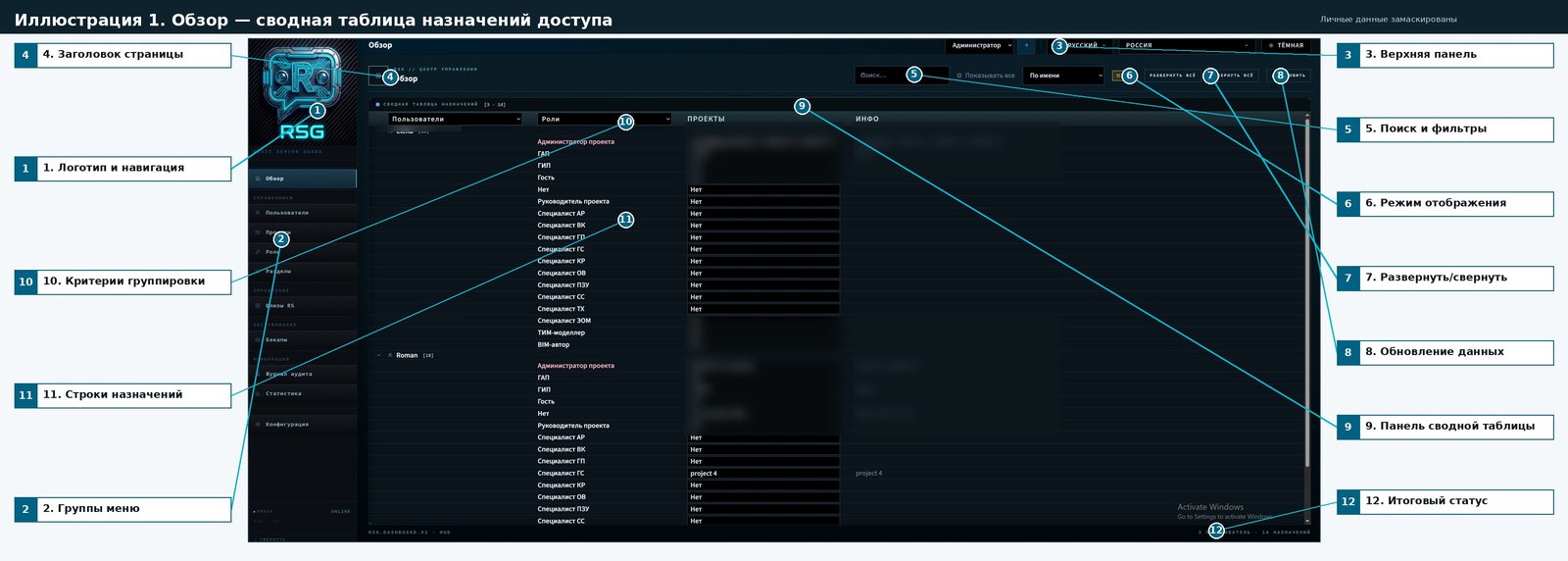
Annotirovannaya version: personalnye znacheniya in tablitsakh/polyakh zamaskirovany; vynoski vyneseny za predely interface.
Podrobnaya legenda
№ | Element | What it does | How it works | Why it is needed |
1 | Overview item 1 | Represents or controls this part of the Overview screen. | Works through the current filters, selection, and RSG API data. | Helps the administrator manage this area faster and with fewer configuration errors. |
2 | Overview item 2 | Represents or controls this part of the Overview screen. | Works through the current filters, selection, and RSG API data. | Helps the administrator manage this area faster and with fewer configuration errors. |
3 | Overview item 3 | Represents or controls this part of the Overview screen. | Works through the current filters, selection, and RSG API data. | Helps the administrator manage this area faster and with fewer configuration errors. |
4 | Overview item 4 | Represents or controls this part of the Overview screen. | Works through the current filters, selection, and RSG API data. | Helps the administrator manage this area faster and with fewer configuration errors. |
5 | Overview item 5 | Represents or controls this part of the Overview screen. | Works through the current filters, selection, and RSG API data. | Helps the administrator manage this area faster and with fewer configuration errors. |
6 | Overview item 6 | Represents or controls this part of the Overview screen. | Works through the current filters, selection, and RSG API data. | Helps the administrator manage this area faster and with fewer configuration errors. |
7 | Overview item 7 | Represents or controls this part of the Overview screen. | Works through the current filters, selection, and RSG API data. | Helps the administrator manage this area faster and with fewer configuration errors. |
8 | Overview item 8 | Represents or controls this part of the Overview screen. | Works through the current filters, selection, and RSG API data. | Helps the administrator manage this area faster and with fewer configuration errors. |
9 | Overview item 9 | Represents or controls this part of the Overview screen. | Works through the current filters, selection, and RSG API data. | Helps the administrator manage this area faster and with fewer configuration errors. |
10 | Overview item 10 | Represents or controls this part of the Overview screen. | Works through the current filters, selection, and RSG API data. | Helps the administrator manage this area faster and with fewer configuration errors. |
11 | Overview item 11 | Represents or controls this part of the Overview screen. | Works through the current filters, selection, and RSG API data. | Helps the administrator manage this area faster and with fewer configuration errors. |
12 | Overview item 12 | Represents or controls this part of the Overview screen. | Works through the current filters, selection, and RSG API data. | Helps the administrator manage this area faster and with fewer configuration errors. |
Privatnost: in izobrazhenii skryty imena users, nazvaniya projectov and/or chuvstvitelnye znacheniya, if oni prisutstvovali on screene.
Illyustratsiya 2. Users — reestr identichnostey and naznacheniya
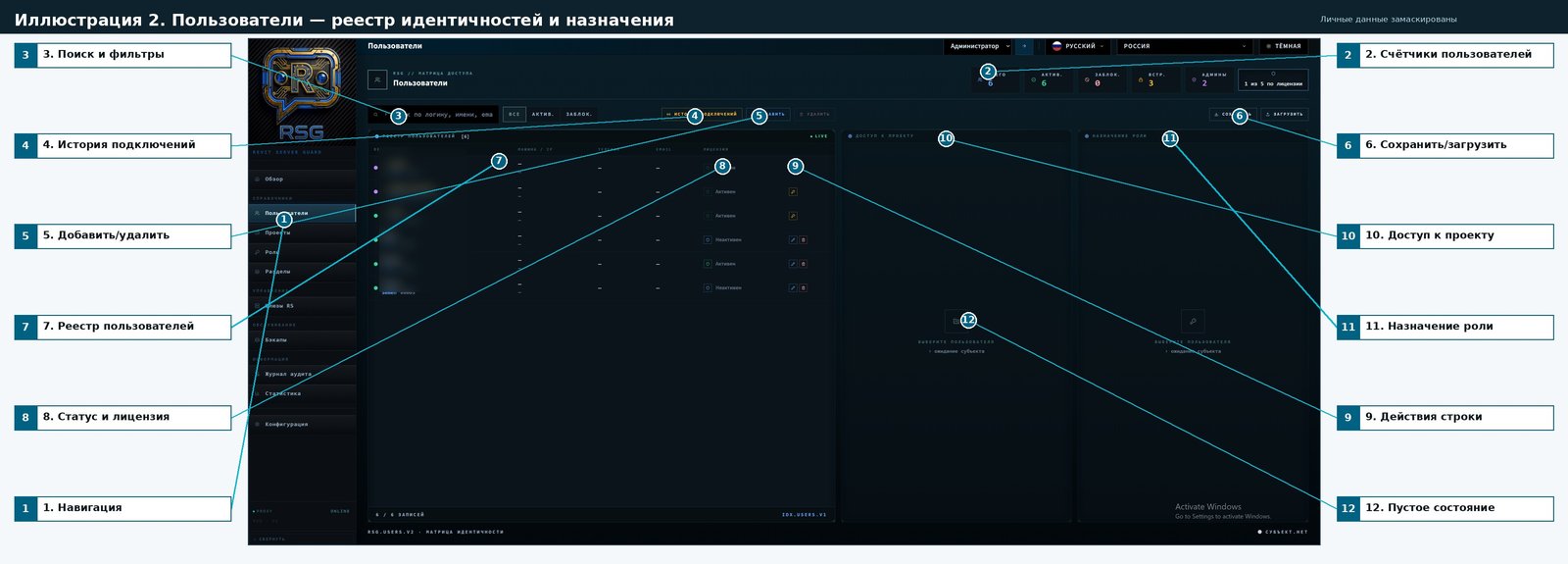
Annotirovannaya version: personalnye znacheniya in tablitsakh/polyakh zamaskirovany; vynoski vyneseny za predely interface.
Podrobnaya legenda
№ | Element | What it does | How it works | Why it is needed |
1 | Users item 1 | Represents or controls this part of the Users screen. | Works through the current filters, selection, and RSG API data. | Helps the administrator manage this area faster and with fewer configuration errors. |
2 | Users item 2 | Represents or controls this part of the Users screen. | Works through the current filters, selection, and RSG API data. | Helps the administrator manage this area faster and with fewer configuration errors. |
3 | Users item 3 | Represents or controls this part of the Users screen. | Works through the current filters, selection, and RSG API data. | Helps the administrator manage this area faster and with fewer configuration errors. |
4 | Users item 4 | Represents or controls this part of the Users screen. | Works through the current filters, selection, and RSG API data. | Helps the administrator manage this area faster and with fewer configuration errors. |
5 | Users item 5 | Represents or controls this part of the Users screen. | Works through the current filters, selection, and RSG API data. | Helps the administrator manage this area faster and with fewer configuration errors. |
6 | Users item 6 | Represents or controls this part of the Users screen. | Works through the current filters, selection, and RSG API data. | Helps the administrator manage this area faster and with fewer configuration errors. |
7 | Users item 7 | Represents or controls this part of the Users screen. | Works through the current filters, selection, and RSG API data. | Helps the administrator manage this area faster and with fewer configuration errors. |
8 | Users item 8 | Represents or controls this part of the Users screen. | Works through the current filters, selection, and RSG API data. | Helps the administrator manage this area faster and with fewer configuration errors. |
9 | Users item 9 | Represents or controls this part of the Users screen. | Works through the current filters, selection, and RSG API data. | Helps the administrator manage this area faster and with fewer configuration errors. |
10 | Users item 10 | Represents or controls this part of the Users screen. | Works through the current filters, selection, and RSG API data. | Helps the administrator manage this area faster and with fewer configuration errors. |
11 | Users item 11 | Represents or controls this part of the Users screen. | Works through the current filters, selection, and RSG API data. | Helps the administrator manage this area faster and with fewer configuration errors. |
12 | Users item 12 | Represents or controls this part of the Users screen. | Works through the current filters, selection, and RSG API data. | Helps the administrator manage this area faster and with fewer configuration errors. |
Privatnost: in izobrazhenii skryty imena users, nazvaniya projectov and/or chuvstvitelnye znacheniya, if oni prisutstvovali on screene.
Illyustratsiya 3. projects — catalog RS, struktura and accessy
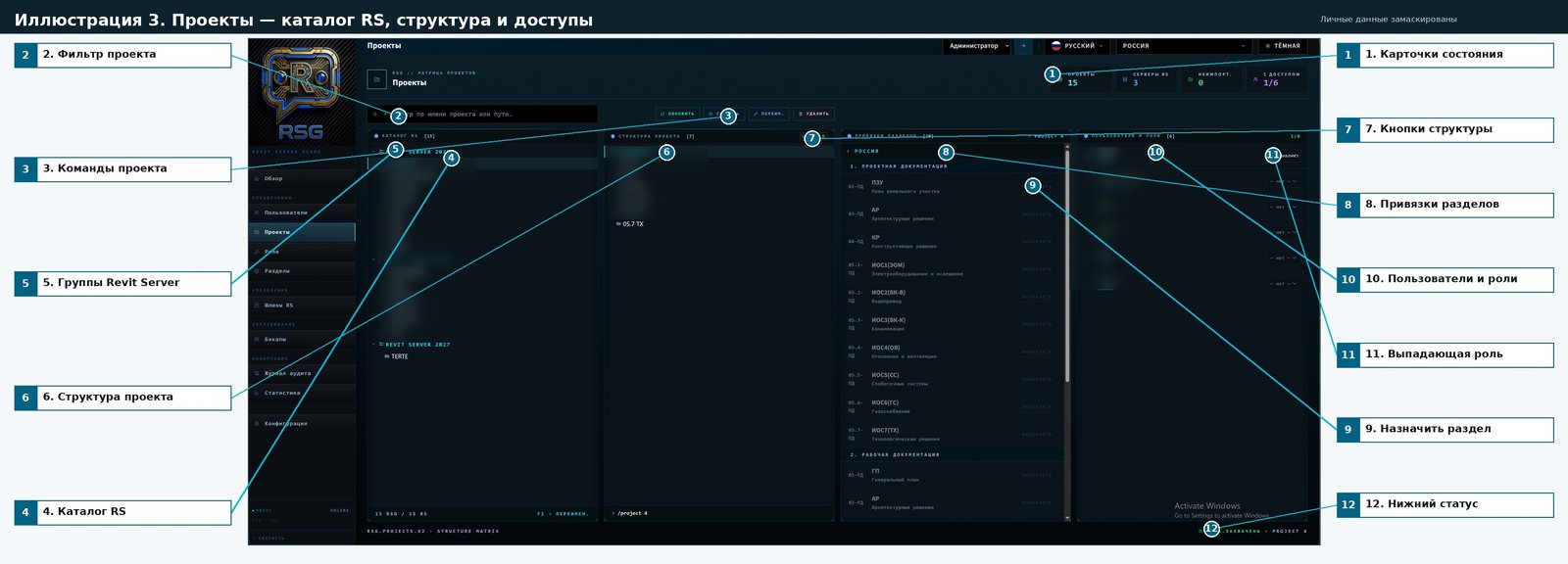
Annotirovannaya version: personalnye znacheniya in tablitsakh/polyakh zamaskirovany; vynoski vyneseny za predely interface.
Podrobnaya legenda
№ | Element | What it does | How it works | Why it is needed |
1 | Projects item 1 | Represents or controls this part of the Projects screen. | Works through the current filters, selection, and RSG API data. | Helps the administrator manage this area faster and with fewer configuration errors. |
2 | Projects item 2 | Represents or controls this part of the Projects screen. | Works through the current filters, selection, and RSG API data. | Helps the administrator manage this area faster and with fewer configuration errors. |
3 | Projects item 3 | Represents or controls this part of the Projects screen. | Works through the current filters, selection, and RSG API data. | Helps the administrator manage this area faster and with fewer configuration errors. |
4 | Projects item 4 | Represents or controls this part of the Projects screen. | Works through the current filters, selection, and RSG API data. | Helps the administrator manage this area faster and with fewer configuration errors. |
5 | Projects item 5 | Represents or controls this part of the Projects screen. | Works through the current filters, selection, and RSG API data. | Helps the administrator manage this area faster and with fewer configuration errors. |
6 | Projects item 6 | Represents or controls this part of the Projects screen. | Works through the current filters, selection, and RSG API data. | Helps the administrator manage this area faster and with fewer configuration errors. |
7 | Projects item 7 | Represents or controls this part of the Projects screen. | Works through the current filters, selection, and RSG API data. | Helps the administrator manage this area faster and with fewer configuration errors. |
8 | Projects item 8 | Represents or controls this part of the Projects screen. | Works through the current filters, selection, and RSG API data. | Helps the administrator manage this area faster and with fewer configuration errors. |
9 | Projects item 9 | Represents or controls this part of the Projects screen. | Works through the current filters, selection, and RSG API data. | Helps the administrator manage this area faster and with fewer configuration errors. |
10 | Projects item 10 | Represents or controls this part of the Projects screen. | Works through the current filters, selection, and RSG API data. | Helps the administrator manage this area faster and with fewer configuration errors. |
11 | Projects item 11 | Represents or controls this part of the Projects screen. | Works through the current filters, selection, and RSG API data. | Helps the administrator manage this area faster and with fewer configuration errors. |
12 | Projects item 12 | Represents or controls this part of the Projects screen. | Works through the current filters, selection, and RSG API data. | Helps the administrator manage this area faster and with fewer configuration errors. |
Privatnost: in izobrazhenii skryty imena users, nazvaniya projectov and/or chuvstvitelnye znacheniya, if oni prisutstvovali on screene.
Illyustratsiya 4. roles — matritsa prav by razdelam
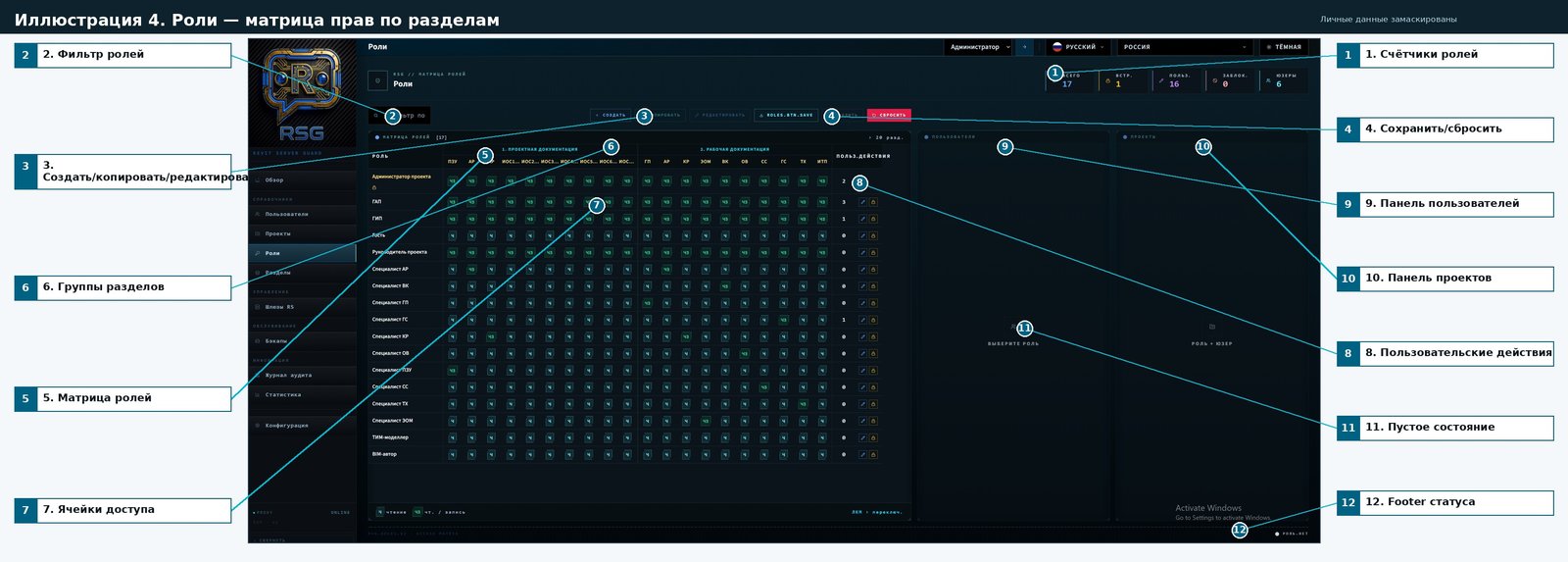
Annotirovannaya version: personalnye znacheniya in tablitsakh/polyakh zamaskirovany; vynoski vyneseny za predely interface.
Podrobnaya legenda
№ | Element | What it does | How it works | Why it is needed |
1 | Roles item 1 | Represents or controls this part of the Roles screen. | Works through the current filters, selection, and RSG API data. | Helps the administrator manage this area faster and with fewer configuration errors. |
2 | Roles item 2 | Represents or controls this part of the Roles screen. | Works through the current filters, selection, and RSG API data. | Helps the administrator manage this area faster and with fewer configuration errors. |
3 | Roles item 3 | Represents or controls this part of the Roles screen. | Works through the current filters, selection, and RSG API data. | Helps the administrator manage this area faster and with fewer configuration errors. |
4 | Roles item 4 | Represents or controls this part of the Roles screen. | Works through the current filters, selection, and RSG API data. | Helps the administrator manage this area faster and with fewer configuration errors. |
5 | Roles item 5 | Represents or controls this part of the Roles screen. | Works through the current filters, selection, and RSG API data. | Helps the administrator manage this area faster and with fewer configuration errors. |
6 | Roles item 6 | Represents or controls this part of the Roles screen. | Works through the current filters, selection, and RSG API data. | Helps the administrator manage this area faster and with fewer configuration errors. |
7 | Roles item 7 | Represents or controls this part of the Roles screen. | Works through the current filters, selection, and RSG API data. | Helps the administrator manage this area faster and with fewer configuration errors. |
8 | Roles item 8 | Represents or controls this part of the Roles screen. | Works through the current filters, selection, and RSG API data. | Helps the administrator manage this area faster and with fewer configuration errors. |
9 | Roles item 9 | Represents or controls this part of the Roles screen. | Works through the current filters, selection, and RSG API data. | Helps the administrator manage this area faster and with fewer configuration errors. |
10 | Roles item 10 | Represents or controls this part of the Roles screen. | Works through the current filters, selection, and RSG API data. | Helps the administrator manage this area faster and with fewer configuration errors. |
11 | Roles item 11 | Represents or controls this part of the Roles screen. | Works through the current filters, selection, and RSG API data. | Helps the administrator manage this area faster and with fewer configuration errors. |
12 | Roles item 12 | Represents or controls this part of the Roles screen. | Works through the current filters, selection, and RSG API data. | Helps the administrator manage this area faster and with fewer configuration errors. |
Privatnost: in izobrazhenii skryty imena users, nazvaniya projectov and/or chuvstvitelnye znacheniya, if oni prisutstvovali on screene.
Illyustratsiya 5. Sections — catalog distsiplin and privyazki
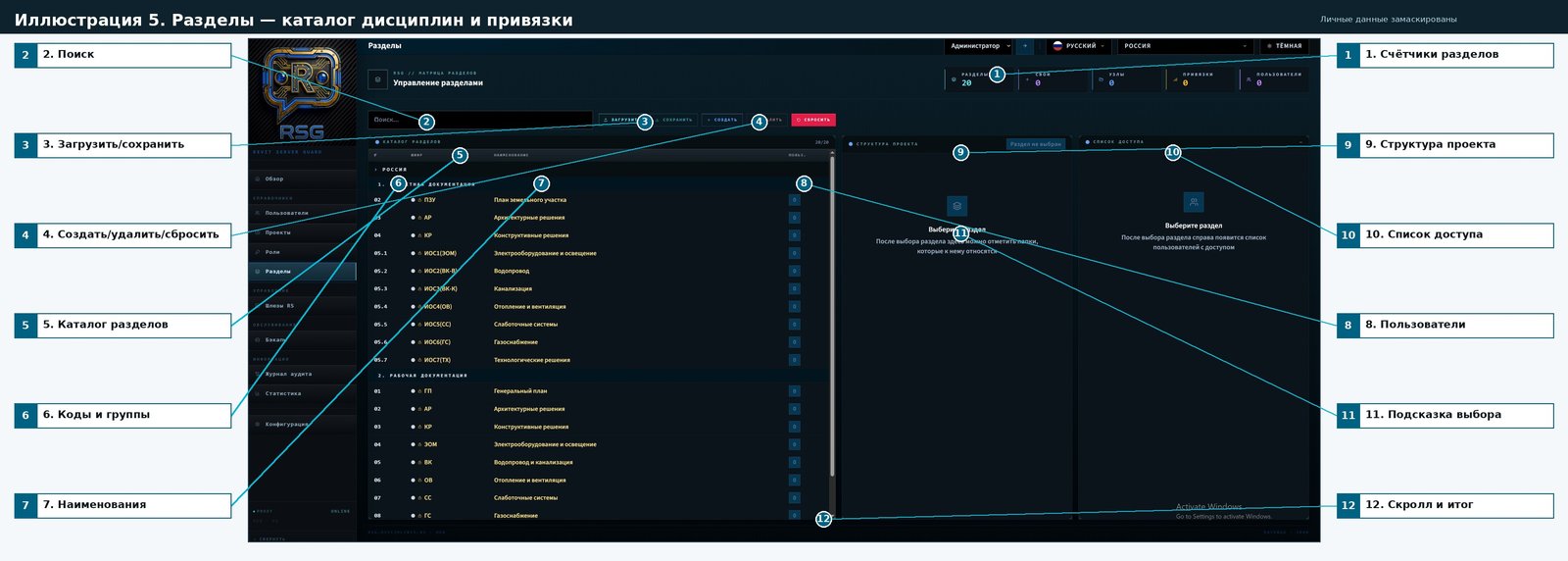
Annotirovannaya version: personalnye znacheniya in tablitsakh/polyakh zamaskirovany; vynoski vyneseny za predely interface.
Podrobnaya legenda
№ | Element | What it does | How it works | Why it is needed |
1 | Projects item 1 | Represents or controls this part of the Sections screen. | Works through the current filters, selection, and RSG API data. | Helps the administrator manage this area faster and with fewer configuration errors. |
2 | Sections item 2 | Represents or controls this part of the Sections screen. | Works through the current filters, selection, and RSG API data. | Helps the administrator manage this area faster and with fewer configuration errors. |
3 | Sections item 3 | Represents or controls this part of the Sections screen. | Works through the current filters, selection, and RSG API data. | Helps the administrator manage this area faster and with fewer configuration errors. |
4 | Sections item 4 | Represents or controls this part of the Sections screen. | Works through the current filters, selection, and RSG API data. | Helps the administrator manage this area faster and with fewer configuration errors. |
5 | Sections item 5 | Represents or controls this part of the Sections screen. | Works through the current filters, selection, and RSG API data. | Helps the administrator manage this area faster and with fewer configuration errors. |
6 | Sections item 6 | Represents or controls this part of the Sections screen. | Works through the current filters, selection, and RSG API data. | Helps the administrator manage this area faster and with fewer configuration errors. |
7 | Sections item 7 | Represents or controls this part of the Sections screen. | Works through the current filters, selection, and RSG API data. | Helps the administrator manage this area faster and with fewer configuration errors. |
8 | Sections item 8 | Represents or controls this part of the Sections screen. | Works through the current filters, selection, and RSG API data. | Helps the administrator manage this area faster and with fewer configuration errors. |
9 | Sections item 9 | Represents or controls this part of the Sections screen. | Works through the current filters, selection, and RSG API data. | Helps the administrator manage this area faster and with fewer configuration errors. |
10 | Sections item 10 | Represents or controls this part of the Sections screen. | Works through the current filters, selection, and RSG API data. | Helps the administrator manage this area faster and with fewer configuration errors. |
11 | Sections item 11 | Represents or controls this part of the Sections screen. | Works through the current filters, selection, and RSG API data. | Helps the administrator manage this area faster and with fewer configuration errors. |
12 | Sections item 12 | Represents or controls this part of the Sections screen. | Works through the current filters, selection, and RSG API data. | Helps the administrator manage this area faster and with fewer configuration errors. |
Privatnost: in izobrazhenii skryty imena users, nazvaniya projectov and/or chuvstvitelnye znacheniya, if oni prisutstvovali on screene.
Illyustratsiya 6. Shlyuzy RS — management proxy and zaschitoy
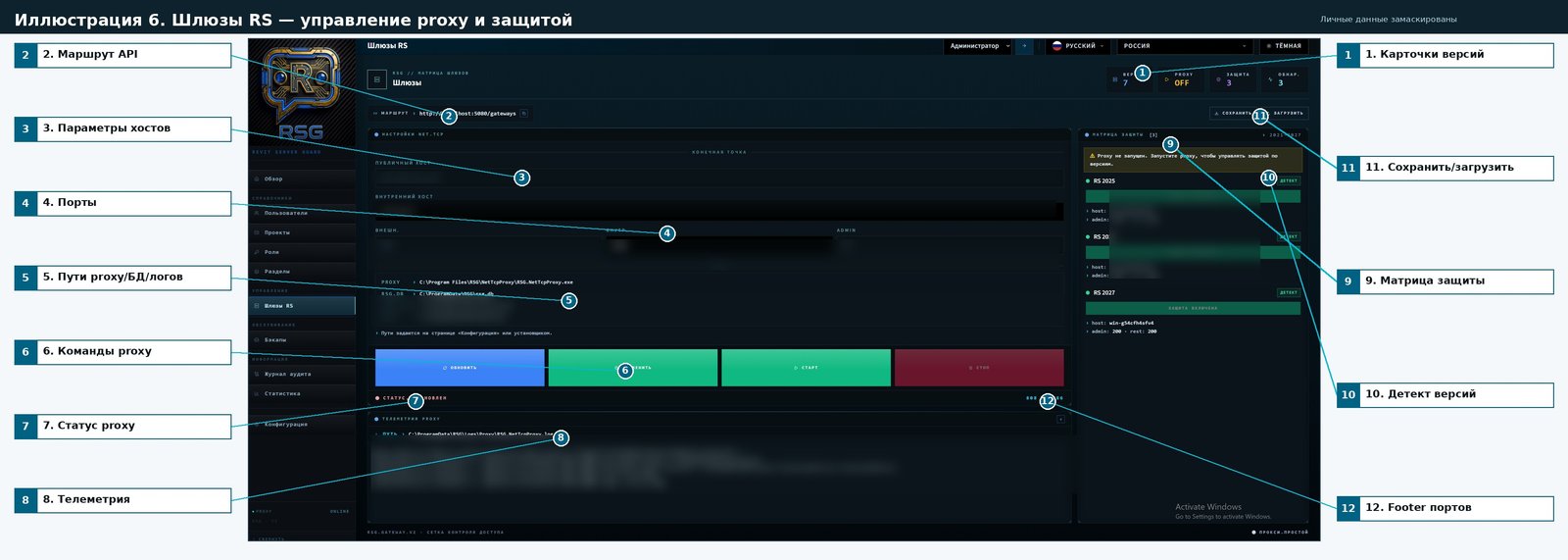
Annotirovannaya version: personalnye znacheniya in tablitsakh/polyakh zamaskirovany; vynoski vyneseny za predely interface.
Podrobnaya legenda
№ | Element | What it does | How it works | Why it is needed |
1 | Projects item 1 | Represents or controls this part of the RS gateways screen. | Works through the current filters, selection, and RSG API data. | Helps the administrator manage this area faster and with fewer configuration errors. |
2 | RS gateways item 2 | Represents or controls this part of the RS gateways screen. | Works through the current filters, selection, and RSG API data. | Helps the administrator manage this area faster and with fewer configuration errors. |
3 | RS gateways item 3 | Represents or controls this part of the RS gateways screen. | Works through the current filters, selection, and RSG API data. | Helps the administrator manage this area faster and with fewer configuration errors. |
4 | RS gateways item 4 | Represents or controls this part of the RS gateways screen. | Works through the current filters, selection, and RSG API data. | Helps the administrator manage this area faster and with fewer configuration errors. |
5 | RS gateways item 5 | Represents or controls this part of the RS gateways screen. | Works through the current filters, selection, and RSG API data. | Helps the administrator manage this area faster and with fewer configuration errors. |
6 | RS gateways item 6 | Represents or controls this part of the RS gateways screen. | Works through the current filters, selection, and RSG API data. | Helps the administrator manage this area faster and with fewer configuration errors. |
7 | RS gateways item 7 | Represents or controls this part of the RS gateways screen. | Works through the current filters, selection, and RSG API data. | Helps the administrator manage this area faster and with fewer configuration errors. |
8 | RS gateways item 8 | Represents or controls this part of the RS gateways screen. | Works through the current filters, selection, and RSG API data. | Helps the administrator manage this area faster and with fewer configuration errors. |
9 | RS gateways item 9 | Represents or controls this part of the RS gateways screen. | Works through the current filters, selection, and RSG API data. | Helps the administrator manage this area faster and with fewer configuration errors. |
10 | RS gateways item 10 | Represents or controls this part of the RS gateways screen. | Works through the current filters, selection, and RSG API data. | Helps the administrator manage this area faster and with fewer configuration errors. |
11 | Users item 6 | Represents or controls this part of the RS gateways screen. | Works through the current filters, selection, and RSG API data. | Helps the administrator manage this area faster and with fewer configuration errors. |
12 | RS gateways item 12 | Represents or controls this part of the RS gateways screen. | Works through the current filters, selection, and RSG API data. | Helps the administrator manage this area faster and with fewer configuration errors. |
Privatnost: in izobrazhenii skryty imena users, nazvaniya projectov and/or chuvstvitelnye znacheniya, if oni prisutstvovali on screene.
Illyustratsiya 7. Bekapy — setka rezervnogo kopirovaniya projectov
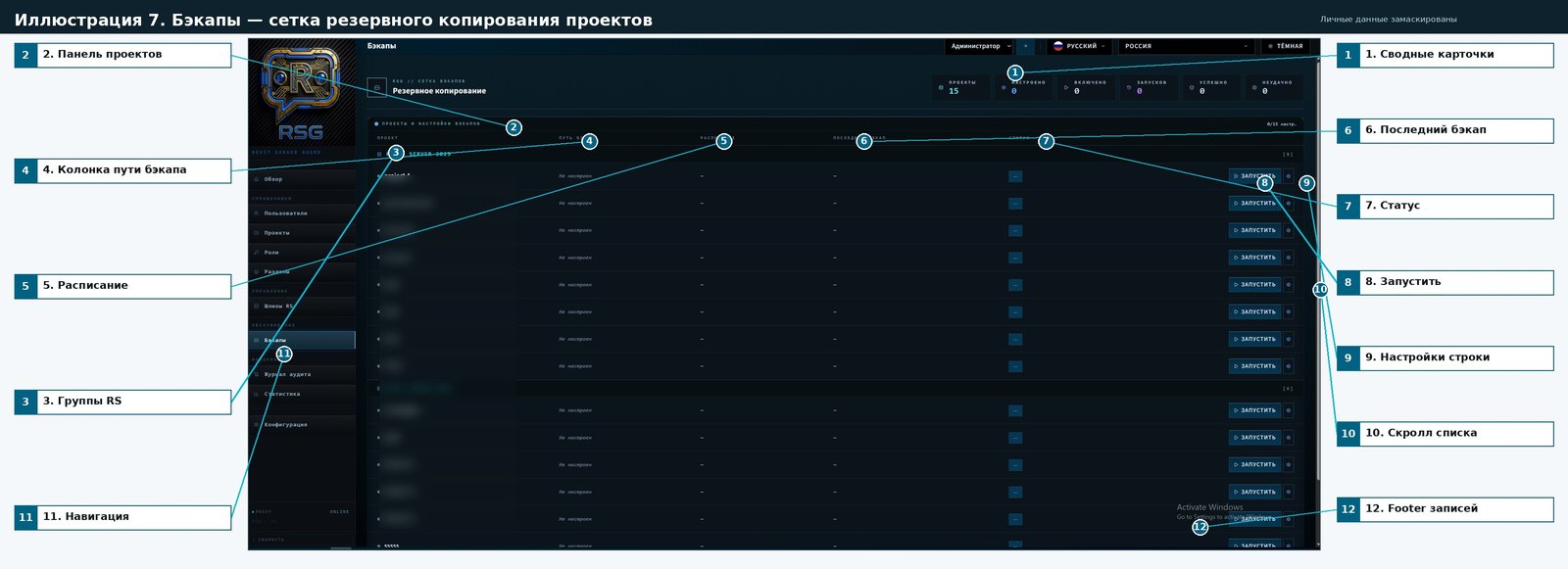
Annotirovannaya version: personalnye znacheniya in tablitsakh/polyakh zamaskirovany; vynoski vyneseny za predely interface.
Podrobnaya legenda
№ | Element | What it does | How it works | Why it is needed |
1 | Projects item 1 | Represents or controls this part of the Backups screen. | Works through the current filters, selection, and RSG API data. | Helps the administrator manage this area faster and with fewer configuration errors. |
2 | Backups item 2 | Represents or controls this part of the Backups screen. | Works through the current filters, selection, and RSG API data. | Helps the administrator manage this area faster and with fewer configuration errors. |
3 | Projects item 5 | Represents or controls this part of the Projects screen. | Works through the current filters, selection, and RSG API data. | Helps the administrator manage this area faster and with fewer configuration errors. |
4 | Backups item 4 | Represents or controls this part of the Backups screen. | Works through the current filters, selection, and RSG API data. | Helps the administrator manage this area faster and with fewer configuration errors. |
5 | Backups item 5 | Represents or controls this part of the Backups screen. | Works through the current filters, selection, and RSG API data. | Helps the administrator manage this area faster and with fewer configuration errors. |
6 | Backups item 6 | Represents or controls this part of the Backups screen. | Works through the current filters, selection, and RSG API data. | Helps the administrator manage this area faster and with fewer configuration errors. |
7 | Backups item 7 | Represents or controls this part of the Backups screen. | Works through the current filters, selection, and RSG API data. | Helps the administrator manage this area faster and with fewer configuration errors. |
8 | Backups item 8 | Represents or controls this part of the Backups screen. | Works through the current filters, selection, and RSG API data. | Helps the administrator manage this area faster and with fewer configuration errors. |
9 | Backups item 9 | Represents or controls this part of the Backups screen. | Works through the current filters, selection, and RSG API data. | Helps the administrator manage this area faster and with fewer configuration errors. |
10 | Backups item 10 | Represents or controls this part of the Backups screen. | Works through the current filters, selection, and RSG API data. | Helps the administrator manage this area faster and with fewer configuration errors. |
11 | Backups item 11 | Represents or controls this part of the Backups screen. | Works through the current filters, selection, and RSG API data. | Helps the administrator manage this area faster and with fewer configuration errors. |
12 | Backups item 12 | Represents or controls this part of the Backups screen. | Works through the current filters, selection, and RSG API data. | Helps the administrator manage this area faster and with fewer configuration errors. |
Privatnost: in izobrazhenii skryty imena users, nazvaniya projectov and/or chuvstvitelnye znacheniya, if oni prisutstvovali on screene.
Illyustratsiya 8. Zhurnal audita — potok sobytiy and eksport
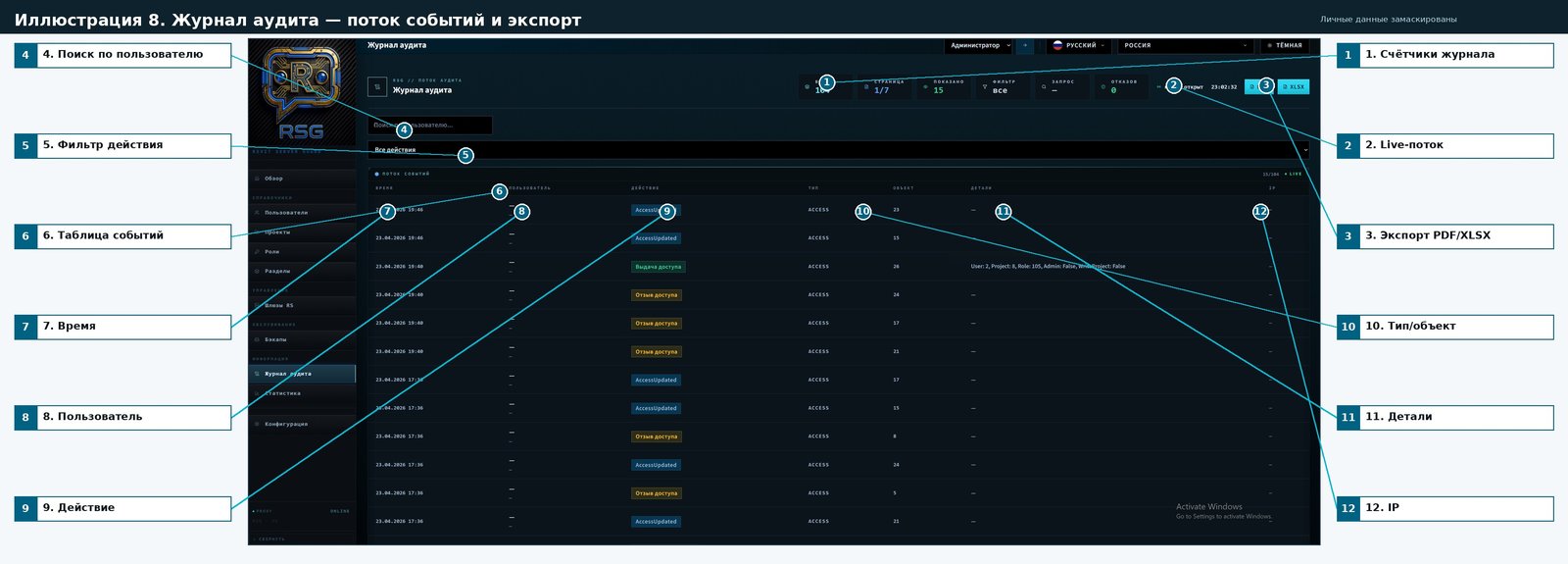
Annotirovannaya version: personalnye znacheniya in tablitsakh/polyakh zamaskirovany; vynoski vyneseny za predely interface.
Podrobnaya legenda
№ | Element | What it does | How it works | Why it is needed |
1 | Audit log item 1 | Represents or controls this part of the Audit log screen. | Works through the current filters, selection, and RSG API data. | Helps the administrator manage this area faster and with fewer configuration errors. |
2 | Audit log item 2 | Represents or controls this part of the Audit log screen. | Works through the current filters, selection, and RSG API data. | Helps the administrator manage this area faster and with fewer configuration errors. |
3 | Audit log item 3 | Represents or controls this part of the Audit log screen. | Works through the current filters, selection, and RSG API data. | Helps the administrator manage this area faster and with fewer configuration errors. |
4 | Audit log item 4 | Represents or controls this part of the Audit log screen. | Works through the current filters, selection, and RSG API data. | Helps the administrator manage this area faster and with fewer configuration errors. |
5 | Audit log item 5 | Represents or controls this part of the Audit log screen. | Works through the current filters, selection, and RSG API data. | Helps the administrator manage this area faster and with fewer configuration errors. |
6 | Audit log item 6 | Represents or controls this part of the Audit log screen. | Works through the current filters, selection, and RSG API data. | Helps the administrator manage this area faster and with fewer configuration errors. |
7 | Audit log item 7 | Represents or controls this part of the Audit log screen. | Works through the current filters, selection, and RSG API data. | Helps the administrator manage this area faster and with fewer configuration errors. |
8 | Audit log item 8 | Represents or controls this part of the Audit log screen. | Works through the current filters, selection, and RSG API data. | Dayot response on vopros «kto izmenil access». Imena in itogovom dokumente zamaskirovany. |
9 | Audit log item 9 | Represents or controls this part of the Audit log screen. | Works through the current filters, selection, and RSG API data. | Helps the administrator manage this area faster and with fewer configuration errors. |
10 | Audit log item 10 | Represents or controls this part of the Audit log screen. | Works through the current filters, selection, and RSG API data. | Helps the administrator manage this area faster and with fewer configuration errors. |
11 | Audit log item 11 | Represents or controls this part of the Audit log screen. | Stroka details formiruetsya serverom; for chuvstvitelnykh znacheniy in dokumente primenena maskirovka. | Helps the administrator manage this area faster and with fewer configuration errors. |
12 | Audit log item 12 | Represents or controls this part of the Audit log screen. | Works through the current filters, selection, and RSG API data. | Helps the administrator manage this area faster and with fewer configuration errors. |
Privatnost: in izobrazhenii skryty imena users, nazvaniya projectov and/or chuvstvitelnye znacheniya, if oni prisutstvovali on screene.
Illyustratsiya 9. Statistika — analytics aktivnosti and otchyoty
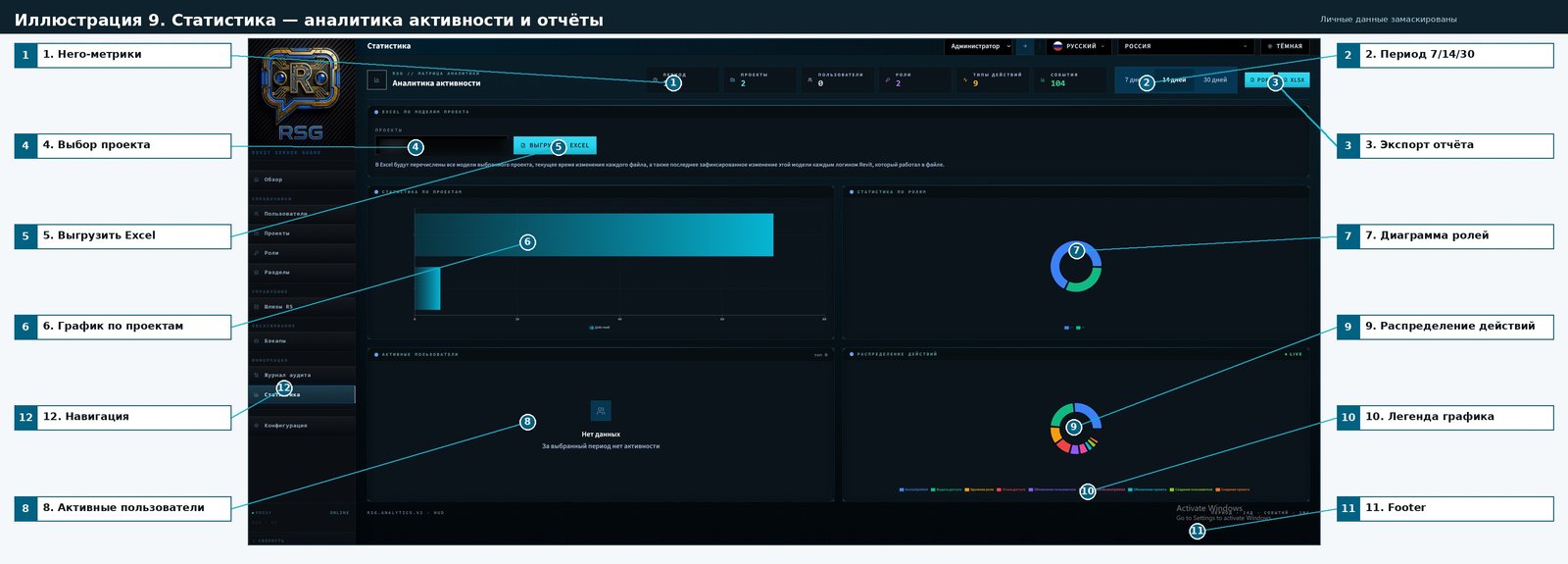
Annotirovannaya version: personalnye znacheniya in tablitsakh/polyakh zamaskirovany; vynoski vyneseny za predely interface.
Podrobnaya legenda
№ | Element | What it does | How it works | Why it is needed |
1 | Statistics item 1 | Represents or controls this part of the Statistics screen. | Works through the current filters, selection, and RSG API data. | Helps the administrator manage this area faster and with fewer configuration errors. |
2 | Statistics item 2 | Represents or controls this part of the Statistics screen. | Works through the current filters, selection, and RSG API data. | Helps the administrator manage this area faster and with fewer configuration errors. |
3 | Audit log item 3 | Represents or controls this part of the Statistics screen. | Works through the current filters, selection, and RSG API data. | Helps the administrator manage this area faster and with fewer configuration errors. |
4 | Statistics item 4 | Represents or controls this part of the Statistics screen. | Works through the current filters, selection, and RSG API data. | Helps the administrator manage this area faster and with fewer configuration errors. |
5 | Statistics item 5 | Represents or controls this part of the Statistics screen. | Works through the current filters, selection, and RSG API data. | Helps the administrator manage this area faster and with fewer configuration errors. |
6 | Statistics item 6 | Represents or controls this part of the Statistics screen. | Works through the current filters, selection, and RSG API data. | Helps the administrator manage this area faster and with fewer configuration errors. |
7 | Statistics item 7 | Represents or controls this part of the Statistics screen. | Works through the current filters, selection, and RSG API data. | Helps the administrator manage this area faster and with fewer configuration errors. |
8 | Statistics item 8 | Represents or controls this part of the Statistics screen. | Works through the current filters, selection, and RSG API data. | Helps the administrator manage this area faster and with fewer configuration errors. |
9 | Statistics item 9 | Represents or controls this part of the Statistics screen. | Works through the current filters, selection, and RSG API data. | Helps the administrator manage this area faster and with fewer configuration errors. |
10 | Statistics item 10 | Represents or controls this part of the Statistics screen. | Works through the current filters, selection, and RSG API data. | Helps the administrator manage this area faster and with fewer configuration errors. |
11 | Statistics item 11 | Represents or controls this part of the Statistics screen. | Works through the current filters, selection, and RSG API data. | Helps the administrator manage this area faster and with fewer configuration errors. |
12 | Statistics item 12 | Represents or controls this part of the Statistics screen. | Works through the current filters, selection, and RSG API data. | Helps the administrator manage this area faster and with fewer configuration errors. |
Privatnost: in izobrazhenii skryty imena users, nazvaniya projectov and/or chuvstvitelnye znacheniya, if oni prisutstvovali on screene.
Illyustratsiya 10. Konfiguratsiya — sistemnye settings, license and vneshniy vid
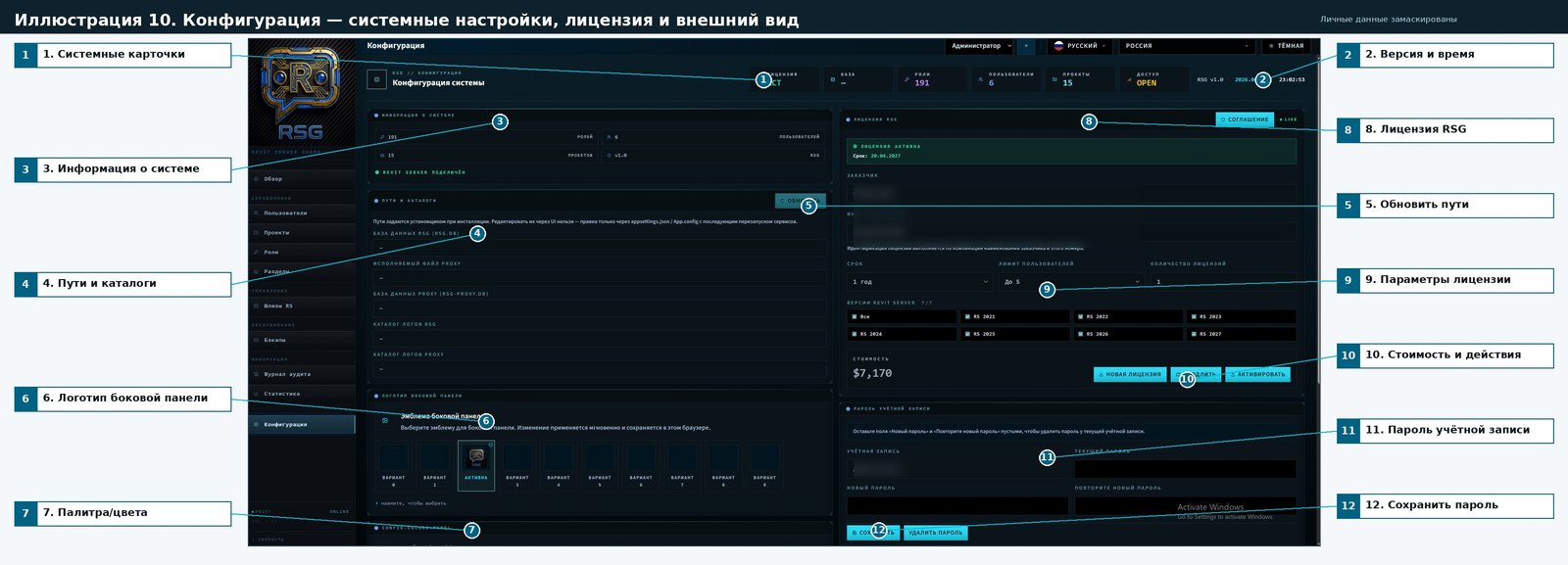
Annotirovannaya version: personalnye znacheniya in tablitsakh/polyakh zamaskirovany; vynoski vyneseny za predely interface.
Podrobnaya legenda
№ | Element | What it does | How it works | Why it is needed |
1 | Configuration item 1 | Represents or controls this part of the Configuration screen. | Works through the current filters, selection, and RSG API data. | Helps the administrator manage this area faster and with fewer configuration errors. |
2 | Configuration item 2 | Represents or controls this part of the Configuration screen. | Works through the current filters, selection, and RSG API data. | Helps the administrator manage this area faster and with fewer configuration errors. |
3 | Configuration item 3 | Represents or controls this part of the Configuration screen. | Works through the current filters, selection, and RSG API data. | Helps the administrator manage this area faster and with fewer configuration errors. |
4 | Configuration item 4 | Represents or controls this part of the Configuration screen. | Works through the current filters, selection, and RSG API data. | Helps the administrator manage this area faster and with fewer configuration errors. |
5 | Configuration item 5 | Represents or controls this part of the Configuration screen. | Works through the current filters, selection, and RSG API data. | Helps the administrator manage this area faster and with fewer configuration errors. |
6 | Configuration item 6 | Represents or controls this part of the Configuration screen. | Works through the current filters, selection, and RSG API data. | Helps the administrator manage this area faster and with fewer configuration errors. |
7 | Configuration item 7 | Represents or controls this part of the Configuration screen. | Works through the current filters, selection, and RSG API data. | Helps the administrator manage this area faster and with fewer configuration errors. |
8 | Configuration item 8 | Represents or controls this part of the Configuration screen. | Works through the current filters, selection, and RSG API data. | Helps the administrator manage this area faster and with fewer configuration errors. |
9 | Configuration item 9 | Represents or controls this part of the Configuration screen. | Works through the current filters, selection, and RSG API data. | Helps the administrator manage this area faster and with fewer configuration errors. |
10 | Configuration item 10 | Represents or controls this part of the Configuration screen. | Works through the current filters, selection, and RSG API data. | Helps the administrator manage this area faster and with fewer configuration errors. |
11 | Configuration item 11 | Represents or controls this part of the Configuration screen. | Works through the current filters, selection, and RSG API data. | Helps the administrator manage this area faster and with fewer configuration errors. |
12 | buttons sokhraneniya parolya | Sokhranyayut new parol or udalyayut suschestvuyuschiy. | Obrabotchik validiruet sovpadenie poley and vyzyvaet API smeny parolya. | Predotvraschaet sluchaynoe raskhozhdenie parolya and podtverzhdeniya. |
Khotite izuchit vtoruyu chast documentation?
Pereyti k kompleksnomu analysisu →