The product name has been standardized: “rs.BricksMap” in plugin windows (license, first launch, purchase and update) and in the Plug-in Manager; “RS.3DS.BricksMap” in the Windows installed programs list and the installer name. The new installer updates the installed version and preserves licenses.
Usage data has been reduced to a minimum: only a “plugin started” flag and the minutes during which the plugin was actually used are sent. The installation identifier, versions, license status and details of your actions are not sent.
1.0.25–1.0.26 | 13.10.2026
Updates for the entire product range in one window: the plugin finds all RS-Systems products for 3ds Max installed on the computer, including products installed later, and offers to update, postpone, skip this version or stop asking for each one. The update button in the license rollout opens this window.
Selected updates are downloaded only from rs-systems.org, with signature, size and checksum verification, and installed as a single batch after all 3ds Max sessions are closed, with one administrator permission prompt. Products installed through the combined RS-Systems 3ds Max Suite package are updated through that package.
Fixed: plugins did not accept the RS-Systems 3ds Max Suite license. A purchased suite now activates every plugin it includes, and the suite activation code can be entered in any of them.
1.0.25 | 03.10.2026
Licensing now follows the common RS-Systems system: signed licenses and a trial period that works without an internet connection.
The license rollout now includes background update checks and an update button.
Sending usage data no longer starts the trial period.
DESCRIPTION
Interface
BricksMap interface and workflow.
BricksMap helps you quickly build repeating materials without manually slicing textures. The plugin generates masonry patterns, controls joints, colors, variations and nested maps, and automatically creates Bump and NormalBump maps for surface relief.
01
Gallery of patterns supported in version 1.0
previews of available patterns;
02
Diffuse colors and maps
Separate colors and maps for Brick 1, Brick 2 and Grout. This lets you mix several materials and assign a separate texture to the joints.
03
Variations
Randomization settings: color variation, hue, random shift, seed, fragmentation and rotation. They make the material less repetitive.
04
BricksMap automatically generates Bump and NormalBump maps.
This is a major advantage of the plugin: after configuring the main pattern, you do not have to draw relief maps separately. Bump and NormalBump are generated automatically from the pattern and depth settings, speeding up material preparation and producing a visually consistent result.
Video · YouTube
BricksMap — video demonstration for Autodesk 3ds Max
BricksMap helps you quickly build repeating materials without manually slicing textures. The plugin generates masonry patterns, controls joints, colors, variations and nested maps, and automatically creates Bump and NormalBump maps for surface relief. Watch the complete workflow and the plugin interface.
The plugin is configured directly in the Material Editor. Choose a pattern, set element and joint dimensions, and control UV transformations, variation, colors, nested maps and the derived Bump / Normal Bump maps.
01
Masonry
Masonry
Brick and masonry patterns for facades, interior walls, cladding and clay brickwork.
The custom Pattern 7 layout for unconventional designs and your own material collections.
Custom pattern
Add your pattern to BricksMap — $50
Your pattern can be added to the plugin for $50. Send any reference image to the site administrator and pay for converting the pattern into a mathematical representation and adding it to the code.
Interface
BricksMap interface and workflow.
The plugin is configured directly in the Material Editor. Choose a pattern, set element and joint dimensions, and control UV transformations, variation, colors, nested maps and the derived Bump / Normal Bump maps.
The standard 3ds Max coordinates section sets the channel and overall projection system used by the procedural BricksMap layout.
02
Brick parameters
Choose the Pattern and Mode, set the number of elements horizontally and vertically, and define module dimensions and joint width.
03
Brick UV transformation
The master pattern transformation controls tiling, offset and rotation of the entire pattern. This section lets you quickly adjust the scale and direction of the masonry.
04
Variations
Randomization settings: color variation, hue, random shift, seed, fragmentation and rotation. They make the material less repetitive.
05
Brick Map transformation
The local transformation of the nested Brick Map within an individual element. It is applied before sampling the child map's color and lets you control the texture of each brick or tile.
06
Diffuse colors and maps
Separate colors and maps for Brick 1, Brick 2 and Grout. This lets you mix several materials and assign a separate texture to the joints.
07
Bump
A child heightfield map for the standard Bump slot. It uses the same masonry pattern and can be enhanced with an additional bump texture.
08
Normal Bump
A child map for tangent-space normals. Connect it to a standard Normal Bump map to obtain consistent relief without preparing a normal map manually.
Automatic relief
BricksMap automatically generates Bump and NormalBump maps.
This is a major advantage of the plugin: after configuring the main pattern, you do not have to draw relief maps separately. Bump and NormalBump are generated automatically from the pattern and depth settings, speeding up material preparation and producing a visually consistent result.
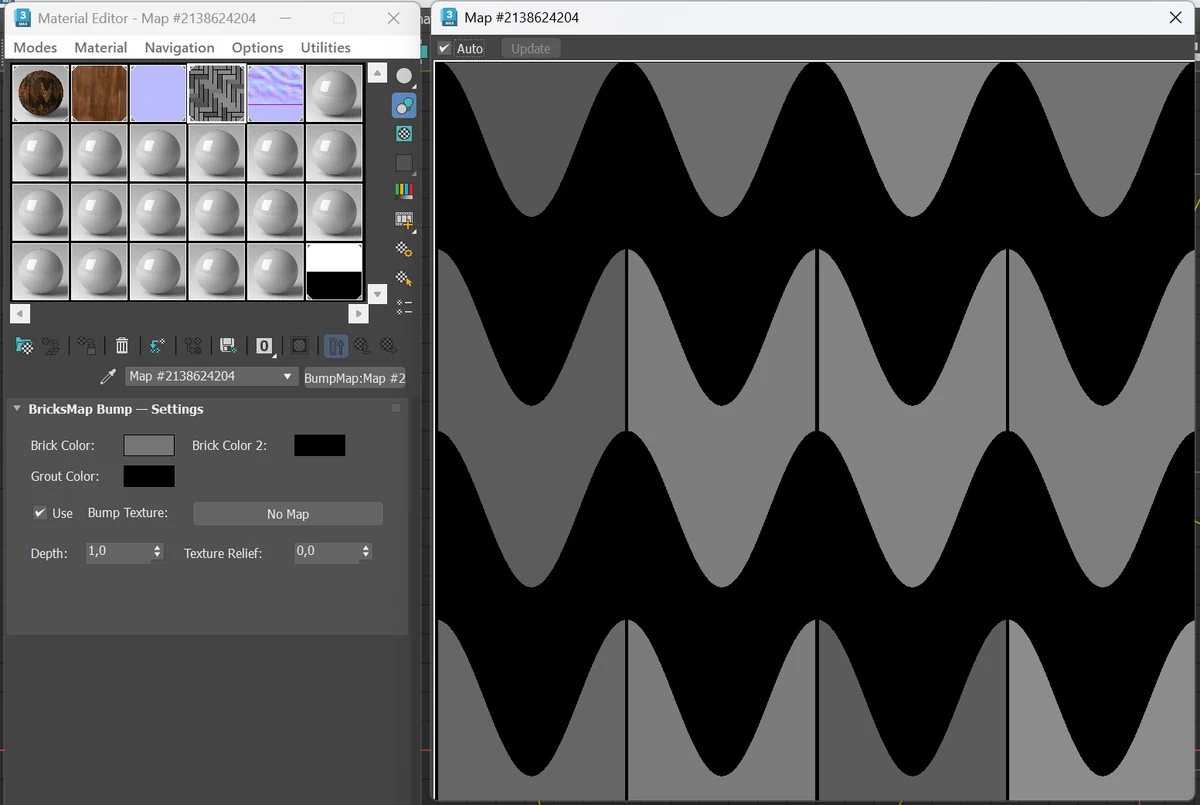
Bump Map The screenshot shows the automatically generated bump map for the Wave Striped pattern. You can also set Depth, Texture Relief and a separate bump texture.
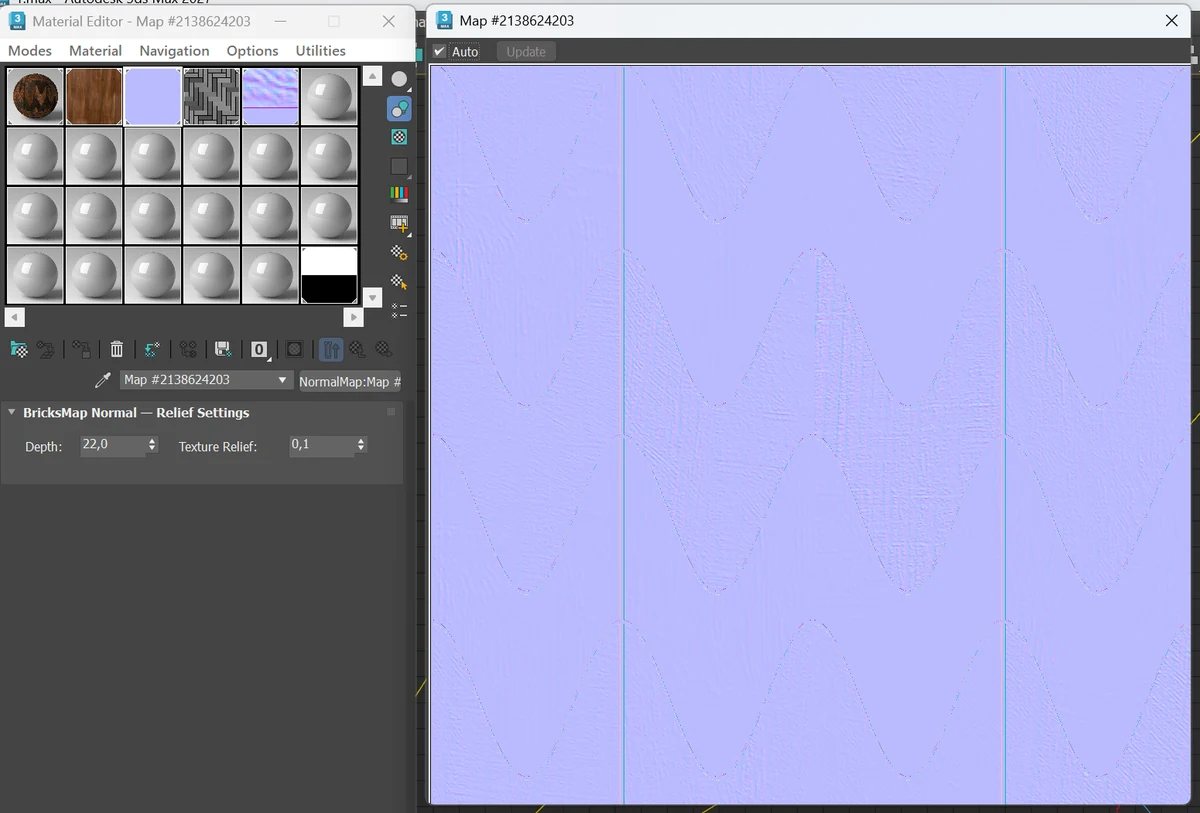
NormalBump Map This screenshot shows BricksMap generating a ready-to-use normal map for the same pattern. This lets you quickly obtain clearly defined relief in lighting and reflections.
Description from the user guide
What each main section of the interface does.
BricksMap is a procedural 2D map for 3ds Max. The main map is used in Diffuse and other material color slots, while the BricksMap Bump and BricksMap Normal child maps automatically synchronize with the same pattern, element dimensions, joints and variations.
01
Brick parameters
Choose the Pattern and Mode, set the number of elements horizontally and vertically, and define module dimensions and joint width.
02
Diffuse colors and maps
Separate colors and maps for Brick 1, Brick 2 and Grout. This lets you mix several materials and assign a separate texture to the joints.
03
BricksMap automatically generates Bump and NormalBump maps.
This is a major advantage of the plugin: after configuring the main pattern, you do not have to draw relief maps separately. Bump and NormalBump are generated automatically from the pattern and depth settings, speeding up material preparation and producing a visually consistent result.
BricksPattern and BricksMap
BricksPattern and BricksMap
the best results come from using them together in the same scene.
BricksMap
BricksMap — a procedural map for brick, tile, parquet and paving
Brick, tile, parquet, paving and custom patterns.
Nested diffuse maps for bricks and joints.
Automatic Bump and NormalBump generation.
Bump and Normal Bump are linked to their parent BricksMap as instances: when the main pattern changes, color and relief update together.
BricksPattern
BricksPattern — a parametric brick and tile surface modifier for 3ds Max
BricksPattern: a mesh modifier for real 3D geometry and close-up detail;
The joints are three-dimensional: depth, bevel angle and width are controlled by parameters. This produces correct shadows and self-occlusion in V-Ray, Corona and other renderers without bump or normal maps.
BricksPattern and BricksMap complement each other. BricksMap is suitable for texture maps throughout a scene and repeating materials; BricksPattern is for foreground surfaces and hero elements that require real 3D brick topology.
Works on any mesh surface, including curved geometry.
BricksMap is sold through its own purchase page, and the license appears in your account after payment. You can then activate the plugin online through the website or offline using an email request and response.
BricksMap can also be activated with an RS-Systems 3ds Max Suite license if the suite includes this plugin. The update button in the license rollout opens the shared update window for all installed RS-Systems products for 3ds Max.